First, Break All the Rules is a fantastic book about management and companies and I highly recommend it for managers and non-managers alike. Toward the end it makes the case that good managers lead to engaged employees.
I was totally enthralled by that term engaged employees. It's a perfect description of one of the characteristics that can make one person so much better at their job than another. I'm sure you've seen examples of this too. One person can be ridiculously smart, and yet do bad work. Or they might be amazingly talented, and still they don't do good work. You see examples of this every day in the grocery store checkout clerk, or the person at the front desk of your hotel, or the cleaning staff at your office, or the police officer directing traffic.
Sometimes when a person isn't performing well in their work, the failure is attributed to them being lazy, or immature, or even that they're just not challenged enough and so are bored. That may all be true, but the problem is really that they are simply not engaged in their work, for reason or another.
It turns out this concept of employee engagement has a rich history dating back to at least 1993 when it was described as "an employee's involvement with, commitment to, and satisfaction with work."
This really goes to the heart of what Peopleware was all about. Every manager wants their employees to be involved and committed to their work, but they all too often forget that they also need to be satisfied with it. Peopleware talks about this all over the place. And probably the two best real world examples are Google and Fog Creek.
Companies with disengaged employees are simply bleeding money. Its like the difference between people who drive the speed limit and coast into all their stops and people who are constantly speeding up to the bumper of the car in front of them and hitting the brakes... The second dude is just throwing gas away and killing his mileage. Every time he pulls around someone and floors it he feels good, but then he has to slam on the brakes again. And when he fills up at the pump and calculates his mileage, he'll blame his car or traffic conditions for the low mileage, anything but himself. This same short sightedness is the reason why companies want to skimp on amenities for their staff or the quality of their product. But its costing them engaged employees.
So engaged employees are important, the challenge is in getting them. Some people need someone around to keep them actively engaged, but others don't. The people that don't need help are your "self-motivated" people. The kind who need to be engaged to be happy. I would argue that most people in the world fall into this category, they just might be engaged in things other than their work. Look at sports. I'm not into sports. At all. I enjoy watching a game, but I just can't get into the stats and the history and memorizing years and events and people and on and on and on... I'm simply amazed by people who can learn all that stuff and talk and argue about it endlessly. The amount of energy and dedication required for that is phenomenal and it takes some serious smarts. Imagine if you could harness just a little bit of that energy and apply it towards something slightly more productive.
And therein lies the rub. How do you get people to be engaged, and more importantly how do you get them engaged in the right things?
I've had the fortune of knowing and working with a lot of smart people. Most have been naturally engaged. But it's interesting to see what that results in. If there is a project at work that excites them, they're all in. But when it doesn't, or when some other factor is causing them to dislike it, they'll find other things to get into: side projects at home, or frameworks or "minor" bugs or related "enhancements" at work. Expending energy on these things is extremely valuable experience to the individual but maybe not so much to the company.
But on the other hand, the greatest breakthroughs can frequently come from people messing with unrelated stuff. Just look at Google's 20% time and the making of ad sense. Ad sense practically single-handedly funds Google, and it was invented by someone in their 20% time. So having some leeway is equally important.
There is a line to walk here. If you have a lot of people who are very engaged, but always in things that don't help you achieve your business goals, you're screwed. And if most of your people are not engaged at all, you're screwed.
Walking this line is going to be difficult, but I would guess that most companies aren't even aware of it. Maybe their employees are engaged anyway, because of good managers or just because of luck. But that doesn't seem too likely.
So how do you get people to be engaged? Peopleware, and First, Break All the Rules, and Joel Spolsky, and 37 Signals can answer that question better than I can, so I'll refer you there.
In the mean time I'm curious, does your company engage you?
Monday, August 31, 2009

Monday, August 24, 2009
Optimize for Success
Lets pretend you are writing some code. This code does something. Occasionally, it may fail for some reason, but we intend it to succeed, and it will succeed more often than it fails.
As an example, lets say we're going to update a record in a database, but before we do we need to a do a get so we can see if any of the values changed. If some values have changed, we'll do some stuff after the update. Maybe we'll send an email or something. We're going to do a concurrency check by optimistic concurrency (see if it changed in any way using a last update timestamp column) before we do our save.
Now, this is just an example so I can make a larger point, so bear with me here. Lets go ahead and pretend we're using LINQ-to-sql to do the update, so LINQ will also do the concurrency check for us.
Our psuedo code looks kind of like this:
Now, if the update fails due to the concurrency check, this will just bomb out.
But notice that when the concurrency check fails, we still did the Get operation. This kind of sucks because we didn't need to do it. And we can't do the Update before we do the Get, that would defeat the purpose. So we're going to have to do the concurrency check manually.
Wait. What? Why am I getting all upset about this? WHO CARES if I do a Get I don't need to do in a failure scenario. Unless there is something unusual about this failure, like it's going to happen all the time, or it has some record locking implications, none of which apply here. I'm optimizing for the wrong thing. I should be optimizing for success, not for failure (While avoiding premature optimization, of course).
If I could remove the Get completely, so the method would Succeed and not need it, that might be something worth talking about. But it is totally not worth adding any code complexity just to optimize this method for a failure case.
Thus: Optimize for Success, and don't get too worked up over failure.
As an example, lets say we're going to update a record in a database, but before we do we need to a do a get so we can see if any of the values changed. If some values have changed, we'll do some stuff after the update. Maybe we'll send an email or something. We're going to do a concurrency check by optimistic concurrency (see if it changed in any way using a last update timestamp column) before we do our save.
Now, this is just an example so I can make a larger point, so bear with me here. Lets go ahead and pretend we're using LINQ-to-sql to do the update, so LINQ will also do the concurrency check for us.
Our psuedo code looks kind of like this:
Get record
Update record
if record.prop changed:
send email
Update record
if record.prop changed:
send email
Now, if the update fails due to the concurrency check, this will just bomb out.
But notice that when the concurrency check fails, we still did the Get operation. This kind of sucks because we didn't need to do it. And we can't do the Update before we do the Get, that would defeat the purpose. So we're going to have to do the concurrency check manually.
Wait. What? Why am I getting all upset about this? WHO CARES if I do a Get I don't need to do in a failure scenario. Unless there is something unusual about this failure, like it's going to happen all the time, or it has some record locking implications, none of which apply here. I'm optimizing for the wrong thing. I should be optimizing for success, not for failure (While avoiding premature optimization, of course).
If I could remove the Get completely, so the method would Succeed and not need it, that might be something worth talking about. But it is totally not worth adding any code complexity just to optimize this method for a failure case.
Thus: Optimize for Success, and don't get too worked up over failure.
Monday, August 17, 2009
Another C# Fluke
Here's some code:
You would expect those two Adds to be equivalent and that after executing them l.Count would be equal to 2.
Instead you get an ArgumentException on the second Add. Turns out System.Collections.Generic.List implements both Add(...) and System.Collections.IList.Add(...) and the interface specific one does some input validation not done by the other Add. This validation doesn't understand Nullable types, so you get an exception.
I guess its a probably a bug, due to the fact that Nullable<> behaves kind of strangely through reflection.
var l = new List<int?>();
l.Add( null );
( ( System.Collections.IList)l ).Add( null );
l.Add( null );
( ( System.Collections.IList)l ).Add( null );
You would expect those two Adds to be equivalent and that after executing them l.Count would be equal to 2.
Instead you get an ArgumentException on the second Add. Turns out System.Collections.Generic.List implements both Add(...) and System.Collections.IList.Add(...) and the interface specific one does some input validation not done by the other Add. This validation doesn't understand Nullable types, so you get an exception.
I guess its a probably a bug, due to the fact that Nullable<> behaves kind of strangely through reflection.
Wednesday, July 29, 2009
A C# Language Quiz
I was writing some code today when I suddenly realized that I didn't how a certain very fundamental part of the C# language would behave.
Here's an example:
If you compile and run that sample what do you think the output will be?
No really, think about it.
Ok, I'll tell you what I thought the output would be. I thought the output would be "a Null Test is a Test".
Ok, now I'm going to tell you what the output is.
"a Null Test is _NOT_ a Test"
Does that surprise you as much as it did me? I think I'm actually happy that it behaves this way, but I'm still surprised.
Here's an example:
using System;
namespace TestNullCastToObject
{
class Program
{
static void Main( string[] args )
{
Test t = null;
object o = t;
if ( o is Test )
Console.WriteLine( "a Null Test is a Test" );
else
Console.WriteLine( "a Null Test is _NOT_ a Test" );
Console.ReadLine();
}
}
class Test
{
public int Id { get; set; }
}
}
namespace TestNullCastToObject
{
class Program
{
static void Main( string[] args )
{
Test t = null;
object o = t;
if ( o is Test )
Console.WriteLine( "a Null Test is a Test" );
else
Console.WriteLine( "a Null Test is _NOT_ a Test" );
Console.ReadLine();
}
}
class Test
{
public int Id { get; set; }
}
}
If you compile and run that sample what do you think the output will be?
No really, think about it.
Ok, I'll tell you what I thought the output would be. I thought the output would be "a Null Test is a Test".
Ok, now I'm going to tell you what the output is.
"a Null Test is _NOT_ a Test"
Does that surprise you as much as it did me? I think I'm actually happy that it behaves this way, but I'm still surprised.
Tuesday, June 30, 2009
SQL Deadlocks: More with child data
In last week's post, SQL Performance: Child data, I wandered through an issue involving caching data about a parent table's child data. In that post I talked about writing SQL that would save a foreign key on the parent table to the most recent child record. This is very simple and would look like this:
This is relatively straight forward. It inserts the child, then updates the parent's cached data. Those two operations are wrapped in a transaction and a try catch to ensure that if anything should fail for any reason, both statements will be rolled back. This ensures data integrity.
And now it's time to talk about deadlocks. This code is susceptible to deadlocks. As a relatively contrived but none the less possible example suppose the following SQL could also be run:
This is because when the second query tries to select from the Child table, it will wait because the first query has inserted a new row and SQL Server's default isolation level is read committed, which means dirty data will not be read, instead it will wait for the data to be committed. So it's going to sit there, waiting for the first query to commit.
This isn't a deadlock yet. The deadlock happens when SQL switches back to the first query and attempts to execute the update on the parent. When it does this, it will try to obtain an exclusive lock on that parent row, but it won't be able to because the second query already has an exclusive lock from it's update. So it will wait for the second query to commit.
The first query is now waiting for the second query which is waiting for the first query and you have yourself a deadlock.
Before we fix it, we should ask ourselves "is this a big deal?" The answer is, it depends, but in general yes. If all your SQL is small and all your transactions complete quickly and you don't have very many users banging on the system concurrently then you probably wont see any deadlocks. But unless you can guarantee that all those conditions will remain the same you have to be at least a little worried. And if those conditions don't apply to you, you definitely have to be worried.
So how do we fix it? First thing we could do is to commit the transaction in the second query before executing the select. If this is possible, then it's a good idea. You want your transaction to commit as quickly as possible and you want to touch as few objects as you can while in the transaction. That said, there are plenty of reasons why you might not be able to commit the transaction after the update. For example, maybe you're reading the child data because you need it to perform another update, and those two updates have to be in the same transaction. In that case, there is nothing you can do to fix query #2.
But even if you could fix query #2, someone could some day come along and write query #3 which would introduce the same problem again. So what we really need to do is fix query #1. The way we do that is by having query #1 obtain a shared lock on all the resources we know it will need to touch, immediately at the top of the query.
Add this code after the BEGIN TRY:
With this code in place, query #2 will not be able to execute it's update until query #1 completes. Thus, preventing the deadlock and saving the day!
This example was simple but the deadlock was still subtle and hard to see. This problem just gets more complicated the more complicated your SQL gets. And your SQL will get more complicated in direct relation to how complicated your data schema is. So you really have to be on the look out for this issue.
Before I wrap this up, I should mention that if you need to lock more than just one row in one table at the top of your query (like we did in query #1), life can get interesting. If the tables you are locking are all related you can lock them by inner joining to them. But if they are unrelated, things get interesting. If they're unrelated, you can't join from one to the next, so you need to execute separate select statements. And if two queries need to lock the same records in two unrelated tables, but they lock them in different orders (A, B vs. B, A) you can end up with a deadlock! For these cases you have to resort to what you learned in your operating systems class: always lock all your resources in the same order. Good luck with that.
I'll leave you with some rules of thumb, which apply to most cases but, of course, not all:
begin tran TxExample
BEGIN TRY
declare @NewChild int
insert into Child ( blah, blah, blah ) values ( @blah, @blah, @blah )
select @NewChildId = SCOPE_IDENTITY()
update Parent set CurrentChildId = @NewChildId where Parent = @ParentId
if @@TRANCOUNT > 0 commit tran TxExample
END TRY
BEGIN CATCH
if @@TRANCOUNT > 0 rollback tran
END CATCH
BEGIN TRY
declare @NewChild int
insert into Child ( blah, blah, blah ) values ( @blah, @blah, @blah )
select @NewChildId = SCOPE_IDENTITY()
update Parent set CurrentChildId = @NewChildId where Parent = @ParentId
if @@TRANCOUNT > 0 commit tran TxExample
END TRY
BEGIN CATCH
if @@TRANCOUNT > 0 rollback tran
END CATCH
This is relatively straight forward. It inserts the child, then updates the parent's cached data. Those two operations are wrapped in a transaction and a try catch to ensure that if anything should fail for any reason, both statements will be rolled back. This ensures data integrity.
And now it's time to talk about deadlocks. This code is susceptible to deadlocks. As a relatively contrived but none the less possible example suppose the following SQL could also be run:
begin tran TxExample2
update Parent set blah = @blah where ParentId = @ParentId
...
select * from Child where ChildParentId = @ParentId
commit tran
If these two queries were to run at the same time, operating on the same parentId, and SQL Server were to context switch them at just the write moment, they would deadlock. Specifically, if the first query completed its insert statement (line 6) and then SQL switched to the second query, we would deadlock.update Parent set blah = @blah where ParentId = @ParentId
...
select * from Child where ChildParentId = @ParentId
commit tran
This is because when the second query tries to select from the Child table, it will wait because the first query has inserted a new row and SQL Server's default isolation level is read committed, which means dirty data will not be read, instead it will wait for the data to be committed. So it's going to sit there, waiting for the first query to commit.
This isn't a deadlock yet. The deadlock happens when SQL switches back to the first query and attempts to execute the update on the parent. When it does this, it will try to obtain an exclusive lock on that parent row, but it won't be able to because the second query already has an exclusive lock from it's update. So it will wait for the second query to commit.
The first query is now waiting for the second query which is waiting for the first query and you have yourself a deadlock.
Before we fix it, we should ask ourselves "is this a big deal?" The answer is, it depends, but in general yes. If all your SQL is small and all your transactions complete quickly and you don't have very many users banging on the system concurrently then you probably wont see any deadlocks. But unless you can guarantee that all those conditions will remain the same you have to be at least a little worried. And if those conditions don't apply to you, you definitely have to be worried.
So how do we fix it? First thing we could do is to commit the transaction in the second query before executing the select. If this is possible, then it's a good idea. You want your transaction to commit as quickly as possible and you want to touch as few objects as you can while in the transaction. That said, there are plenty of reasons why you might not be able to commit the transaction after the update. For example, maybe you're reading the child data because you need it to perform another update, and those two updates have to be in the same transaction. In that case, there is nothing you can do to fix query #2.
But even if you could fix query #2, someone could some day come along and write query #3 which would introduce the same problem again. So what we really need to do is fix query #1. The way we do that is by having query #1 obtain a shared lock on all the resources we know it will need to touch, immediately at the top of the query.
Add this code after the BEGIN TRY:
set transaction isolation level repeatableread
select ParentId from Parent where ParentId = @ParentId
set transaction isolation level readcommitted
select ParentId from Parent where ParentId = @ParentId
set transaction isolation level readcommitted
With this code in place, query #2 will not be able to execute it's update until query #1 completes. Thus, preventing the deadlock and saving the day!
This example was simple but the deadlock was still subtle and hard to see. This problem just gets more complicated the more complicated your SQL gets. And your SQL will get more complicated in direct relation to how complicated your data schema is. So you really have to be on the look out for this issue.
Before I wrap this up, I should mention that if you need to lock more than just one row in one table at the top of your query (like we did in query #1), life can get interesting. If the tables you are locking are all related you can lock them by inner joining to them. But if they are unrelated, things get interesting. If they're unrelated, you can't join from one to the next, so you need to execute separate select statements. And if two queries need to lock the same records in two unrelated tables, but they lock them in different orders (A, B vs. B, A) you can end up with a deadlock! For these cases you have to resort to what you learned in your operating systems class: always lock all your resources in the same order. Good luck with that.
I'll leave you with some rules of thumb, which apply to most cases but, of course, not all:
- Keep your transactions as small as possible by touching as few objects as possible
- Keep your transactions as fast as possible: if you have a query that can execute on n records in a single transaction where n is unbounded you are likely to find yourself in a world of hurt
- Obtain shared locks on everything your transaction will eventually require exclusive locks on before you acquire any other locks
- If you need to do any reads that don't need to be repeatable, do them before you obtain any shared or exclusive locks (this is really just in keeping with #2)
- If you set the transaction isolation level to repeatable read make sure you're setting it back to read committed (even if its the last line of your query, this will make sure triggers don't execute in repeatable read)
Monday, June 29, 2009
SQL Performance: Child data
In this post I’d like to talk about a specific issue in SQL and all the various ways you could approach it. Specifically, I’d like to talk about dealing with a parent entity’s child data. As an example lets use a very simple document database that stores documents and their versions. Obviously, a document will have many versions but each version will have only one document, as in this diagram:

This is not a complete database, clearly, but it indicates that the DocumentVersion table is a child of the Document table.
Now we get to the part where this gets at least partly interesting. Lets say we’re going to write a search that returns documents. In the results we want to display information about the current version of each document as well as the total number of versions for each document.
This is a surprisingly non trivial query…
select d.Id, d.Name, v.Id, v.FileName, v.Extension, v.FileSize,
( select count(Id) from DocumentVersion where DocumentId = d.Id ) as numVersions
from Document d
inner join DocumentVersion v on d.Id = v.DocumentId
where v.Id = ( select max(Id) from DocumentVersion where DocumentId = d.Id )
( select count(Id) from DocumentVersion where DocumentId = d.Id ) as numVersions
from Document d
inner join DocumentVersion v on d.Id = v.DocumentId
where v.Id = ( select max(Id) from DocumentVersion where DocumentId = d.Id )
Now, there are a bunch of ways to write this, but this is a perfectly good example. Notice we have an inner select in the select clause to get the number of versions and we have another select in the where to get “latest” version. Here I’m depending on SQL Server’s Identity Specification to give me the latest row because it simplifies the query. If we didn’t want to do that, I’d have to either “select top 1” while ordering by the inserted date (which isn’t on the table in our example) or use a row number function and get the row where the row number = 1 again ordered by the inserted date. Both of these query are correlated, meaning they're run for each document in our results.
This query is ugly, but it works. We could optimize it and tweak the way its written to try to get the best possible performance out of it. But is this really the best way to do this? If we think about it, we’re going to be looking at all the versions for every document returned in our search. The more documents we return, the worse this is. But worse, we’re going to do WAY more reads than we are updates in this case. New versions simply are not going to be added that often. So it seems silly to be constantly looking up information about the versions over and over and over and over again when we know its unlikely it will have changed from the last time we looked at it.
Wouldn’t it be better to cache this information on the Document table so we don’t have to keep calculating it repeatedly, thereby simplifying the query and improving its performance?
To do this, we simply add “NumVersions” and “CurrentDocumentVersionId” columns to the Document table. But now we have to keep these columns up to date. There are a few ways to do this:
- Trigger on DocumentVersion updates Document’s cached columns on Insert/Delete
- Code that does inserts or deletes to DocumentVersion must update cached columns
- Cached columns are calculated columns that use a function to lookup values
- Ensures the columns will always be up to date, no matter how the version records are changed
- Code will be in just one place and we wont have to worry about it again
- Slow (like, REALLY slow. Batch operations like inserting or deleting many versions will slow to a crawl)
- Potential for subtle and hard to track down deadlock problems
- Increased code complexity because the trigger must be written to handle ALL cases, even if you only use some (ex: inserting many versions at once)
- Simplest possible code
- Performant
- Deadlock issues are easier to see and handle
- Same code may end up in many places (ex: Insert and Delete stored procedures, if using sps)
- Potential for error if someone inserts/deletes versions from a new location and forgets to update the cached columns
So, between #1, #2, and #3, which is the right option?
I used to use triggers, because of fear that someone would forget to update the columns if I went with #2. But the performance and deadlocking issues with triggers has now caused me to go with the "API layer" approach of #2.
I think the answer, as always, is it depends. If the tables you're using are likely to be always accessed through an API layer, then you should go with #2. But if many people will be manipulating those tables from many different areas and there is no central API layer, you're pretty much forced to go with #1.
And the question remains, is it really worth caching the data this way, or should you just keep the lookups in the queries. Once again, my favorite theme for this blog: it depends. The big question is really performance, and that depends on how the queries will be used. Are you going to be returning thousands of results, or just hundreds? Are you going to be running this query often?
In SQL there is no one size fits all rule. And worse, SQL is so complex it has to be treated as a black box, meaning you really can't reason about it. Therefore, your only hope is to test and test and test. You pretty much have to write the query every way you can imagine and then performance test each one... And that takes a lot of time.
As Scott Hanselman would say, "Dear Reader," what do you think? Have you been faced with this issue? What did you do?
Monday, June 22, 2009
The Paradox of Quality
In college I had a professor named Dr. Lang. He was a great guy, and he was full of great quotes. Some of them were just inane, but others were serious and insightful. Though, usually even those were fairly silly. One of those was, "All programmers are control freaks."
There is a lot of truth to that, but I think there is a deeper reason that causes that control freak behavior. The control freak behavior is just a side effect of a deeper motivation, namely that developers are quality freaks.
The book "First, Break All The Rules" is a really great "management" book that focuses on the concept of "talents." They use the word talent in a different way than we typically use it in conversation, and they break it down in to different kinds of talents. Of particular interest is what they call Striving talents,
What about factors for code quality:
Realizing that quality means different things to different people at different times is important to remaining sane. Especially when you're a quality driven developer. But as we've seen, quality is a slippery contradictory customer, and this really makes things non-trivial. One thing that might help is focusing on an intended audience to help you decide just what quality matters the most to that audience. By focusing on an imaginary third party’s quality needs you can remove some of your own quality driven needs and find acceptable compromises.
There is a lot of truth to that, but I think there is a deeper reason that causes that control freak behavior. The control freak behavior is just a side effect of a deeper motivation, namely that developers are quality freaks.
The book "First, Break All The Rules" is a really great "management" book that focuses on the concept of "talents." They use the word talent in a different way than we typically use it in conversation, and they break it down in to different kinds of talents. Of particular interest is what they call Striving talents,
"Striving talents explain the why of a person. They explain why he gets out of bed every day, why he is motivated to push and push just that little bit harder. Is he driven by his desire to stand out, or is good enough good enough for him? Is he intensely competitive or intensely altruistic or both? Does he define himself by his technical competence, or does he just want to be liked?"
Given this definition, I think we can make the case that developers have the Quality Striving Talent. This is what drives us to want our code to be perfect and our UIs to be perfect and our architecture to be perfect and our designs to be perfect and on and on. Without this talent, I think a developer would go completely insane!
But, quality is not a very straight forward concept, which brings us to:
Paradox #1: Programmers vs Management
Programmers, being so quality driven, want quality in everything they do. Like, the aforementioned, code, UI, architecture, design, etc.
On the other hand management wants a product that people will buy. Obviously, quality factors in here too: people will want quality in the product they buy, so management will want quality in the product they sell. But management doesn't need quality that goes as deep as the programmers are interested in. After all, very little of the details of programming are visible to the users or to management.
The paradox here is clear, and it explains an awful lot of the friction you can encounter between programmers and management.
Paradox #2: Quality is in the eye of the beholder
For example, one person may like a UI with bright color, gradients, shadows, reflections, slidy animations and some content mixed in where it fits. Other people might look at that UI and see distracting noise and bloat. They would prefer black on white densely packed text emphasizing content.
To each his own I guess. But, which of these UIs is higher quality?
Which of these paintings is higher quality?


Paradox #3: Defining Quality
This has been a lot of talk about quality, but what is quality? Here are some factors you might look at to define the quality of an application:
- Bug count
- Learnability
- User Friendliness
- Appearance
- Feature parity
What about factors for code quality:
- Bug count
- Simplicity
- Cohesion
- Readability
- Lines of code
- Style
- Broken Windows
Realizing that quality means different things to different people at different times is important to remaining sane. Especially when you're a quality driven developer. But as we've seen, quality is a slippery contradictory customer, and this really makes things non-trivial. One thing that might help is focusing on an intended audience to help you decide just what quality matters the most to that audience. By focusing on an imaginary third party’s quality needs you can remove some of your own quality driven needs and find acceptable compromises.
Tuesday, June 9, 2009
An Anemic Community
I am a .NET developer. I've dabbled with Ruby and Python, learned Java and C++ in college, but there's no two ways about it, I'm a .NET dev. Occasionally I think it would be nice to work at one of those dev shops that hires out bodies to companies that need them so that I'd get to work with more languages. But most of the time I like being specialized, it means I have time to really learn my language and its tools. And it should mean that I turn out higher quality product because of it.
.NET is a great platform. The language is very much at the front of the curve as far as strongly typed languages go, and with C# 4.0 coming it will soon be incorporating a number of dynamic language concepts as well. Plus, as IronRuby and IronPython mature, it may become feasible to work with dynamic languages for some things and static for others, which is cool. Add to this picture LINQ, Windows Forms, WPF, WCF, ASP.NET and MVC and you're looking at a pretty compelling platform.
Now, the platform itself has its issues. The major one being that the tooling is targeted at the "least common demoninator" developer, which can make things interesting for a dev working with non-trivial applications in a non-trivial environment. But, that's a topic for another blog post. For our purposes here, lets agree that .NET as a platform is pretty darn good.
Unfortunately, the .NET community kind of sucks. There has been some improvement here in recent years with things like ALT.NET, but for the most part, the community remains pretty anemic. Compare it with the Java community for example. The vast majority of the non-microsoft products in .NET are ports from Java: nhibernate and nunit for example. Or compare it with jquery, the number of quality plugins and code samples is just ridiculous. It's a bloody fruited plain!
Now take a look at the blog posts that turn up from Google searches for .NET stuff. Especially around WPF and WCF all you find is amature quality stuff. Look at Codeplex, all you find are tons of discontinued projects people started, and what work remains there is terrible. And don't even get me started on the half solutions that riddle Code Project.
Why is this? There are a large number of .NET developers. There are all kinds of conferences and user groups. So why would it be that there is so little happening on the web with .NET. And why is it that what is happening is so bad?
I think its because .NET is a corporate community. The people who are sharing their work or writing code sample blog posts are either amatures, college kids, or "low ranking" people just getting started in their career. The actual "professionals" who are doing good work are doing it for some company or other and are unable to share it on the web! The few who actually do get involved on the web stick with waxing philosophical on their blogs (kind of like what I do...) and don't really add much value. Worse, if there were projects available, many companies wouldn't use them simply because they weren't Microsoft's.
The corporate view point is that any ideas or tools or products that have been developed by their people represent a competitive advantage. Giving away your advantage in the interest of helping the community is just stupid. Who would do such a thing?
Because of this there is little organizing going on. People are not starting useful and interesting projects and finding contributors. They can't, for fear that their employer will find out and they'll get into some kind of trouble they don't understand.
This is a real problem for .NET. I think that's why Microsoft works so hard at planting .NET bloggers in the community, like some kind of covert operation run by the CIA. That's helpful, because those people are writing good useful stuff. But it all falls short of any kind of organizing. And it also tends to keep its sights quite low, not really trying to contribute anything impressive.
The fact that no one is sharing really lowers the averge state of the art across the board. The ridiculous strides taken by Ruby on Rails and jQuery are examples of how much an open oriented platform can do. It makes it easier for people to jump on board and do non-trivial things. It also makes it more likely that as those people gain experience they'll contribute back. If it goes well, you can get a kind of snow ball effect where the people keep getting better and better and so does the technology.
I'm unclear on how the .NET world could begin to do this, since its so corporate driven. All I know is the low quality material makes a .NET developers life much much harder. And at times, its really frustrating.
.NET is a great platform. The language is very much at the front of the curve as far as strongly typed languages go, and with C# 4.0 coming it will soon be incorporating a number of dynamic language concepts as well. Plus, as IronRuby and IronPython mature, it may become feasible to work with dynamic languages for some things and static for others, which is cool. Add to this picture LINQ, Windows Forms, WPF, WCF, ASP.NET and MVC and you're looking at a pretty compelling platform.
Now, the platform itself has its issues. The major one being that the tooling is targeted at the "least common demoninator" developer, which can make things interesting for a dev working with non-trivial applications in a non-trivial environment. But, that's a topic for another blog post. For our purposes here, lets agree that .NET as a platform is pretty darn good.
Unfortunately, the .NET community kind of sucks. There has been some improvement here in recent years with things like ALT.NET, but for the most part, the community remains pretty anemic. Compare it with the Java community for example. The vast majority of the non-microsoft products in .NET are ports from Java: nhibernate and nunit for example. Or compare it with jquery, the number of quality plugins and code samples is just ridiculous. It's a bloody fruited plain!
Now take a look at the blog posts that turn up from Google searches for .NET stuff. Especially around WPF and WCF all you find is amature quality stuff. Look at Codeplex, all you find are tons of discontinued projects people started, and what work remains there is terrible. And don't even get me started on the half solutions that riddle Code Project.
Why is this? There are a large number of .NET developers. There are all kinds of conferences and user groups. So why would it be that there is so little happening on the web with .NET. And why is it that what is happening is so bad?
I think its because .NET is a corporate community. The people who are sharing their work or writing code sample blog posts are either amatures, college kids, or "low ranking" people just getting started in their career. The actual "professionals" who are doing good work are doing it for some company or other and are unable to share it on the web! The few who actually do get involved on the web stick with waxing philosophical on their blogs (kind of like what I do...) and don't really add much value. Worse, if there were projects available, many companies wouldn't use them simply because they weren't Microsoft's.
The corporate view point is that any ideas or tools or products that have been developed by their people represent a competitive advantage. Giving away your advantage in the interest of helping the community is just stupid. Who would do such a thing?
Because of this there is little organizing going on. People are not starting useful and interesting projects and finding contributors. They can't, for fear that their employer will find out and they'll get into some kind of trouble they don't understand.
This is a real problem for .NET. I think that's why Microsoft works so hard at planting .NET bloggers in the community, like some kind of covert operation run by the CIA. That's helpful, because those people are writing good useful stuff. But it all falls short of any kind of organizing. And it also tends to keep its sights quite low, not really trying to contribute anything impressive.
The fact that no one is sharing really lowers the averge state of the art across the board. The ridiculous strides taken by Ruby on Rails and jQuery are examples of how much an open oriented platform can do. It makes it easier for people to jump on board and do non-trivial things. It also makes it more likely that as those people gain experience they'll contribute back. If it goes well, you can get a kind of snow ball effect where the people keep getting better and better and so does the technology.
I'm unclear on how the .NET world could begin to do this, since its so corporate driven. All I know is the low quality material makes a .NET developers life much much harder. And at times, its really frustrating.
Monday, June 8, 2009
Thinking like a TDDer
Welcome to my 100th post! I'm going to return to a topic that I've touched on many times in the past, namely, unit testing.
Unit testing is one of those things that is very attractive in principle but gets ugly real fast in practice. I've tried it countless times but never managed to follow through. But in principle, I'm a fan. Having tests to fall back on to help prevent regression and to make refactoring easier and less stressful is a big win. And following the TDD process is very rewarding. Every couple minutes you get another green bubble, encouraging you, telling you you're making progress and doing a good job. Plus, unit testing reinforces the benefits of following good design practices like loose coupling, DRY, and Do One Thing (which are all the same...).
For me personally, unit testing still has 2 primary stumbling blocks:
The second issue is "Maintenance development," by which I mean, going back to code you've written and changing it. When I'm first working on some code I find TDD very easy, but when I have to go back to it to fix bugs or add features I always go straight for the code and cause my Unit Tests to be out of date. And therefore, worthless.
A Continuous Integration server which ran the Unit Tests would force me to keep the tests up to date, but I don't like to be forced to do things. In fact, I'd probably just start commenting out the failing tests so I could get my bug fix checked in. Yeah, I know! Hideous behavior right? Should be punishable by death. But I'm lazy, and so are you.
My problem is that I'm still not thinking like a TDDer. If a TDDer needed to fix a bug, they would start by adding a failing test, then they would work until the test passed, THEN they'd try to repo the bug and make sure it was gone. That's the process they would follow, but what's really interesting in the mindset that process requires.
You've probably heard people say that tests are as good as if not better than documentation. I've even heard people says tests can replace specifications! These people are completely insane! Lock them up in a padded room, throw away the key, and please please please don't let them write any more blog posts!
Ok, I know, they aren't REALLY crazy, they're just using the words to mean something different than what the words REALLY mean. Welcome to software development, we love overrides so much we can't resist overriding words in the English language!
So if you fight through the crazy and think about the documentation argument for a moment, that unit tests are documentation, you can see where this might make sense. First, assume we're talking about API documentation and not end user documentation, obviously. I'd like to see an end user figure out which button they need to click on the screen by reading a bunch of unit tests. Don't worry, I'm sure they'll re-up your contract next year!
Anyway, you have a bunch of tests like, Apply_is_enabled_when_required_fields_are_filled() and so forth. A smart enough and patient enough person could read through tests like this and figure out what the object under test does and how to code against it. In fact, because of the volume of code in the tests, they'd be able to understand and extract much more meaning than they could from some MSDN style documentation.
But can you imagine if the only documentation Microsoft published for the .NET framework was its unit tests? The MSDN style docs are hard enough most of the time! Unit tests ARE NOT documentation! But they are incredibly documentative (made up words are fun!), and they are very very useful for someone who intends to work on the object under test. So, it makes a lot of sense to think about them this way. That is, its a useful mindset.
What about the argument that they are specifications. This one is even more off base. A specification is what you write up front to describe what the software should do and how it should work and basically what it should look like. Yeah, Agile people jump up and down and say you don't need specs. "Just write a story card!" they squeak. "Pin it to your wall!" Sorry little agile buddy, your story card is not a spec. It's not even the replacement of a spec. At some point you're still sitting down and figuring out what the software needs to do, and deciding how it should work. Maybe you're meeting with your "customer representative" and you show him your little story card and he starts rambling on about the details of that story while you furiously scribble notes on a legal pad. Then you sit down with your programming buddy (read: "pair") and you start writing code. Well, the scribbles on your note pad are the spec.
Despite all the condescending language in that paragraph, this is actually fine by me. As long you manage to capture enough detail in that meeting and are able to think through the consequences of your implementation decisions as well as the issues of integrating this part with the other parts of your software, this is a perfectly acceptable way of producing specifications. You might want to be a bit more diligent if you are writing the software that flys the space shuttle, but for most business and banking apps, I think you'll be just fine.
But, back to my point, unit tests are not Specifications. However, they do specify how the object under test should behave. In fact, they *should* specify absolutely everything about how that object should behave, if they're going to be truly effective. And this again indicates something about the mindset of the TDDer.
If unit tests are really going to work, they have to be more than regression tests. And they have to be more than a crutch you lean on during "initial development." They have to be both documentation and specification. This mind set leads you to all kinds of realizations.
For example, to be effective documentation and specification, they have to focus on behavior and they have to have good names. So, "Add_returns_false_null_person" is not a good test name. Maybe you should have gone with "Add_fails_when_person_is_missing."
If you're thinking about your tests this way and someone finds a bug, what's the best way to approach it? Not diving into the code and looking at stack traces trying to find the line of code that's in error, no sir! If there's a bug, you must have missed something in your specification of the problem. So what you're going to do is go look through your spec, find the missing piece that explains the bug, then update your spec.
What this means is that your goal when you're writing your tests shouldn't really be code coverage. And it shouldn't be to test every input/output combination. It should be to fully describe and specify all the required and expected behavior of the object you are testing. These should more or less turn out to be the same thing, but because the mindset is so completely different the details will be different. The details will be better. And you might actually stand a chance at keeping those tests up to date. Heck, you might even enjoy keeping them up to date instead of feeling like it's a chore.
Well, I don't know, that's asking a lot.
Is changing the way you approach your tests going to keep the real life details from getting ugly? Nope. You're still going to end up with test code that is ridiculously repetitive because you have to test the same method with these inputs, and those inputs, and those other inputs. And you'll still have to update all this repetitive code when you decide to change the type of one of the method parameters. And you'll still struggle with different ways to refactor your tests to cut down on the repetitiveness, which adds more abstraction and occasionally doesn't work out so well. And don't forget, you'll still be mocking out the dependencies. You know how I feel about mocking.
But now that your tests are more valueable, at least in your mind, this might all be worth it. I guess we'll just have to try it and see.
Unit testing is one of those things that is very attractive in principle but gets ugly real fast in practice. I've tried it countless times but never managed to follow through. But in principle, I'm a fan. Having tests to fall back on to help prevent regression and to make refactoring easier and less stressful is a big win. And following the TDD process is very rewarding. Every couple minutes you get another green bubble, encouraging you, telling you you're making progress and doing a good job. Plus, unit testing reinforces the benefits of following good design practices like loose coupling, DRY, and Do One Thing (which are all the same...).
For me personally, unit testing still has 2 primary stumbling blocks:
- Mocking
- "Maintenance" development
The second issue is "Maintenance development," by which I mean, going back to code you've written and changing it. When I'm first working on some code I find TDD very easy, but when I have to go back to it to fix bugs or add features I always go straight for the code and cause my Unit Tests to be out of date. And therefore, worthless.
A Continuous Integration server which ran the Unit Tests would force me to keep the tests up to date, but I don't like to be forced to do things. In fact, I'd probably just start commenting out the failing tests so I could get my bug fix checked in. Yeah, I know! Hideous behavior right? Should be punishable by death. But I'm lazy, and so are you.
My problem is that I'm still not thinking like a TDDer. If a TDDer needed to fix a bug, they would start by adding a failing test, then they would work until the test passed, THEN they'd try to repo the bug and make sure it was gone. That's the process they would follow, but what's really interesting in the mindset that process requires.
You've probably heard people say that tests are as good as if not better than documentation. I've even heard people says tests can replace specifications! These people are completely insane! Lock them up in a padded room, throw away the key, and please please please don't let them write any more blog posts!
Ok, I know, they aren't REALLY crazy, they're just using the words to mean something different than what the words REALLY mean. Welcome to software development, we love overrides so much we can't resist overriding words in the English language!
So if you fight through the crazy and think about the documentation argument for a moment, that unit tests are documentation, you can see where this might make sense. First, assume we're talking about API documentation and not end user documentation, obviously. I'd like to see an end user figure out which button they need to click on the screen by reading a bunch of unit tests. Don't worry, I'm sure they'll re-up your contract next year!
Anyway, you have a bunch of tests like, Apply_is_enabled_when_required_fields_are_filled() and so forth. A smart enough and patient enough person could read through tests like this and figure out what the object under test does and how to code against it. In fact, because of the volume of code in the tests, they'd be able to understand and extract much more meaning than they could from some MSDN style documentation.
But can you imagine if the only documentation Microsoft published for the .NET framework was its unit tests? The MSDN style docs are hard enough most of the time! Unit tests ARE NOT documentation! But they are incredibly documentative (made up words are fun!), and they are very very useful for someone who intends to work on the object under test. So, it makes a lot of sense to think about them this way. That is, its a useful mindset.
What about the argument that they are specifications. This one is even more off base. A specification is what you write up front to describe what the software should do and how it should work and basically what it should look like. Yeah, Agile people jump up and down and say you don't need specs. "Just write a story card!" they squeak. "Pin it to your wall!" Sorry little agile buddy, your story card is not a spec. It's not even the replacement of a spec. At some point you're still sitting down and figuring out what the software needs to do, and deciding how it should work. Maybe you're meeting with your "customer representative" and you show him your little story card and he starts rambling on about the details of that story while you furiously scribble notes on a legal pad. Then you sit down with your programming buddy (read: "pair") and you start writing code. Well, the scribbles on your note pad are the spec.
Despite all the condescending language in that paragraph, this is actually fine by me. As long you manage to capture enough detail in that meeting and are able to think through the consequences of your implementation decisions as well as the issues of integrating this part with the other parts of your software, this is a perfectly acceptable way of producing specifications. You might want to be a bit more diligent if you are writing the software that flys the space shuttle, but for most business and banking apps, I think you'll be just fine.
But, back to my point, unit tests are not Specifications. However, they do specify how the object under test should behave. In fact, they *should* specify absolutely everything about how that object should behave, if they're going to be truly effective. And this again indicates something about the mindset of the TDDer.
If unit tests are really going to work, they have to be more than regression tests. And they have to be more than a crutch you lean on during "initial development." They have to be both documentation and specification. This mind set leads you to all kinds of realizations.
For example, to be effective documentation and specification, they have to focus on behavior and they have to have good names. So, "Add_returns_false_null_person" is not a good test name. Maybe you should have gone with "Add_fails_when_person_is_missing."
If you're thinking about your tests this way and someone finds a bug, what's the best way to approach it? Not diving into the code and looking at stack traces trying to find the line of code that's in error, no sir! If there's a bug, you must have missed something in your specification of the problem. So what you're going to do is go look through your spec, find the missing piece that explains the bug, then update your spec.
What this means is that your goal when you're writing your tests shouldn't really be code coverage. And it shouldn't be to test every input/output combination. It should be to fully describe and specify all the required and expected behavior of the object you are testing. These should more or less turn out to be the same thing, but because the mindset is so completely different the details will be different. The details will be better. And you might actually stand a chance at keeping those tests up to date. Heck, you might even enjoy keeping them up to date instead of feeling like it's a chore.
Well, I don't know, that's asking a lot.
Is changing the way you approach your tests going to keep the real life details from getting ugly? Nope. You're still going to end up with test code that is ridiculously repetitive because you have to test the same method with these inputs, and those inputs, and those other inputs. And you'll still have to update all this repetitive code when you decide to change the type of one of the method parameters. And you'll still struggle with different ways to refactor your tests to cut down on the repetitiveness, which adds more abstraction and occasionally doesn't work out so well. And don't forget, you'll still be mocking out the dependencies. You know how I feel about mocking.
But now that your tests are more valueable, at least in your mind, this might all be worth it. I guess we'll just have to try it and see.
Friday, May 1, 2009
What Mercurial Can't Do: Subtree Repos
On the Mercurial website, at the very bottom of this page is a section titled "What Mercurial can't do" which says it can't host related projects together in one repository. Then it links out to the Forest Extension which makes nesting repositories easier to work with (and which comes with TortoiseHg, you just have to turn it on).
Its true that Mercurial can't do this, not even with the Forest Extension. Apparently there are plans for Mercurial to build some kind of subtree repo support in the near future. However, I'm not sure what it will look like. It might not enable the behavior I'm going to discuss here. We'll have to wait and see.
To describe what this really means, here's a possible layout you might find in TFS:
In this example MathUtils and GraphUtils are seperate projects which have been written to be reused by other projects. ProjectA is reusing both of them.
ProjectA could just reference $\MathUtils and $\GraphUtils directly. But if there are many projects reusing them and making changes to them that could get hairy. Every time someone in ProjectB changes MathUtils and checks in, they could potentially break ProjectA immediately. To avoid this, ProjectA wants to isolate itself from changes other people might be making to the shared utils. To do this, they create a branch of MathUtils and GraphUtils in their own project. Now they can decide when the right time to bring in changes from other people is, or when the right time to share their own changes with other people is.
To bring in changes from outside in TFS you'd right click on $\MathUtils and say merge, selecting $\ProjectA\MathUtils as the target. To push changes back in TFS you'd right click on $\ProjectA\MathUtils and say merge, selecting $\MathUtils as the target.
In TFS, if you made changes to ProjectA and MathUtils and checked in, you'd get a single checkin containing all changes. When you then merged MathUtils back, the changeset would basically be split so only the changes to $\ProjectA\MathUtils got merged to $\MathUtils (For more on how TFS does merges, check out this post What Mercurial Can't Do: Merge by Changeset). This works because TFS doesn't respect "changesets" across branches.
This does not work in Mercurial. You could setup the same directory tree structure, but you couldn't have just one repository. Instead, you'd have to have $\ProjectA\MathUtils and $\ProjectA\GraphUtils setup as their own repositories nested in the $\ProjectA repository. Mercurial is smart, and it wont try to check in MathUtils or GraphUtils to ProjectA because it recoginizes them to be distinct repos.
So this setup actually works just fine, but it's more work. In TFS, we could do one checkin. In Mercurial, we'll have to checkin changes to each repo individually. That's probably not such a big deal, but in TFS you didn't have to keep track of where you were making changes. In Mercurial you might forget you changed something in MathUtils, and then you might forget to check it in. This is because when you do an "hg status" you'll only see changes in ProjectA. This is where the Forest Extension comes in handy. It adds an "hg fstatus" command which is basically a recursive status command. That way you wont lose track of your changes, but you still have to commit them individually.
But lets think about this for a minute. Is it really a smart thing to do, having one changeset with changes that affect both ProjectA and MathUtils? What's your checkin comment likely to be? Probably something like "ProjectA's xxx feature now can whizbang." If you're looking at the change history for $\Project\MathUtils and you see "ProjectA's xxx feature now can whizbang" does that makes any sense? Does it tell you what changed in MathUtils?
So once again, this is something that Mercurial just can't do. But maybe that's a good thing.
Its true that Mercurial can't do this, not even with the Forest Extension. Apparently there are plans for Mercurial to build some kind of subtree repo support in the near future. However, I'm not sure what it will look like. It might not enable the behavior I'm going to discuss here. We'll have to wait and see.
To describe what this really means, here's a possible layout you might find in TFS:
$\
MathUtils\
GraphUtils\
ProjectA\
ProjectA\
MathUtils\
GraphUtils\
MathUtils\
GraphUtils\
ProjectA\
ProjectA\
MathUtils\
GraphUtils\
In this example MathUtils and GraphUtils are seperate projects which have been written to be reused by other projects. ProjectA is reusing both of them.
ProjectA could just reference $\MathUtils and $\GraphUtils directly. But if there are many projects reusing them and making changes to them that could get hairy. Every time someone in ProjectB changes MathUtils and checks in, they could potentially break ProjectA immediately. To avoid this, ProjectA wants to isolate itself from changes other people might be making to the shared utils. To do this, they create a branch of MathUtils and GraphUtils in their own project. Now they can decide when the right time to bring in changes from other people is, or when the right time to share their own changes with other people is.
To bring in changes from outside in TFS you'd right click on $\MathUtils and say merge, selecting $\ProjectA\MathUtils as the target. To push changes back in TFS you'd right click on $\ProjectA\MathUtils and say merge, selecting $\MathUtils as the target.
In TFS, if you made changes to ProjectA and MathUtils and checked in, you'd get a single checkin containing all changes. When you then merged MathUtils back, the changeset would basically be split so only the changes to $\ProjectA\MathUtils got merged to $\MathUtils (For more on how TFS does merges, check out this post What Mercurial Can't Do: Merge by Changeset). This works because TFS doesn't respect "changesets" across branches.
This does not work in Mercurial. You could setup the same directory tree structure, but you couldn't have just one repository. Instead, you'd have to have $\ProjectA\MathUtils and $\ProjectA\GraphUtils setup as their own repositories nested in the $\ProjectA repository. Mercurial is smart, and it wont try to check in MathUtils or GraphUtils to ProjectA because it recoginizes them to be distinct repos.
So this setup actually works just fine, but it's more work. In TFS, we could do one checkin. In Mercurial, we'll have to checkin changes to each repo individually. That's probably not such a big deal, but in TFS you didn't have to keep track of where you were making changes. In Mercurial you might forget you changed something in MathUtils, and then you might forget to check it in. This is because when you do an "hg status" you'll only see changes in ProjectA. This is where the Forest Extension comes in handy. It adds an "hg fstatus" command which is basically a recursive status command. That way you wont lose track of your changes, but you still have to commit them individually.
But lets think about this for a minute. Is it really a smart thing to do, having one changeset with changes that affect both ProjectA and MathUtils? What's your checkin comment likely to be? Probably something like "ProjectA's xxx feature now can whizbang." If you're looking at the change history for $\Project\MathUtils and you see "ProjectA's xxx feature now can whizbang" does that makes any sense? Does it tell you what changed in MathUtils?
So once again, this is something that Mercurial just can't do. But maybe that's a good thing.
Thursday, April 30, 2009
What Mercurial Can't Do: Merge by Changeset
UPDATE 12/1/2011: Mercurial CAN do this! You used to need to enable the transplant extension. But since v2.0 it's included out of the box in the form of the graft command. I should also note that the problems I mention with this approach in TFS do not exist in the Mercurial. So, basically, go use the graft command and don't read this old post (unless you want to read about how bad TFS is).
Mercurial is a distributed source control system that works very well on Windows and has great windows shell integration with TortoiseHg.
TFS is a centralized behemoth that does source control but also integrates (usually poorly) with every product Microsoft has ever released (not including Bob).
I've used both of these, but I've used TFS much more extensively. I recently started looking into what it would take to switch from TFS to Mercurial and was rather surprised to find a couple things that TFS can do that Mercurial cannot.
The first of these is the ability to do a merge by changeset. In TFS, say you create some branches as follows:
In TFS you could do this very easily.
You cannot do this in Mercurial, at least, not with a "merge" operation. The only way to accomplish the same type of thing would be to create a patch out of NewBranch and apply it to Source using the hg export and hg import commands.
So the big question is, why can't you do this in Mercurial? The answer goes to the heart of what makes Mercurial so different from TFS. The first thing to realize is that Mercurial does not have "branch lines."
In TFS when you branch code TFS knows that the one is a parent of the other and you can only merge across that branch line. This means you can't do merges between two siblings. For example, in B -> A <- C, you can't merge B to C. You can only merge along the branch lines (Unless you do a baseless merge, which doesn't really count).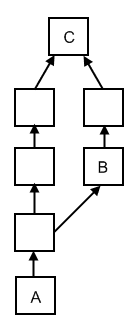 In Mercurial, the normal way of creating a branch is to simply clone the repository, which means you have a full copy of the entire history of the repo. The image to the right shows what an hg pull would look like when bringing changes from a cloned repository into the original repository.
"A" represents the starting point. "B" represents the first change from the repository we're pulling in. What you can see here is that when you pull changes from mercurial, a temporary "branch" is created containing all the changesets from NewProject in parallel with any changesets from Source.
"C" is the only actual merge, in the tranditional way we think of merging, because it actually brings all the changes together. This is beautiful in its simplicity because until you get to C you don't have to do any work. Each changeset represents what changed from the parent, so you just import all the changesets and associate them with the correct parent. Then only at the very end do you have to do any merges.
A merge in TFS is not so clever. Basically all TFS does is figure out every file that changed on either side, and do a 3-way merge on each in turn, resulting in a new changeset. The upside of this is we can select a single changeset, ignore all the changesets around it, and do a merge.
In Mercurial, you can't pick just one changeset and merge. You have to merge all the changesets before it too because that's the definition of how a merge works in Mercurial. The upside of this is that all the changesets are preserved.
For example, say you want to know who added a certain file. In mercurial, you'll be able to figure this out regardless of what "branch" (cloned repository) it was added in. In TFS, you're screwed because the file will be added in a "merge" changeset. The merge may not have been done by the same person who added the file (in fact, it usually wont be), so to find out who added it, you have to manually follow the branches and inspect the history on each in turn. The same is true (and worse, actually) if you want to know who updated a line in a certain file.
Sadly for me, we're constantly "de-tangling" our changes by doing merges by changeset. But lets think about that for a minute. Is merging a single changeset even a sane thing to do? It turns out, not so much, because its possible for this to result in a broken state. Here's how:
This happens like all the freaking time with project files (which are the bane of branches and merges). But fortunately it's easy to fix. Just remove the missing files from the project file. But I think you can probably see that if this happened to any file other than the project file, like a real source file, you'd be in a world of hurt.
I'm actually STUNNED, given how much effort TFS puts into protecting the users from themselves that it allows you to merge selected changesets in this way! But it does. And its a feature that Mercurial just can't match, even if it is a feature that can lead to trouble. But maybe that's a good thing.
Mercurial is a distributed source control system that works very well on Windows and has great windows shell integration with TortoiseHg.
TFS is a centralized behemoth that does source control but also integrates (usually poorly) with every product Microsoft has ever released (not including Bob).
I've used both of these, but I've used TFS much more extensively. I recently started looking into what it would take to switch from TFS to Mercurial and was rather surprised to find a couple things that TFS can do that Mercurial cannot.
The first of these is the ability to do a merge by changeset. In TFS, say you create some branches as follows:
- Create a new TFS project called Project
- Check in some source at $\Project\Source
- Branch that source to $\Project\NewBranch
- Do 3 checkins to $\Project\NewBranch
In TFS you could do this very easily.
- In Source Control Explorer, go to $\Project\NewBranch
- Right click and select "merge"
- Change to the "Merge by selected changeset" radio button
- Make sure the target is $\Project\Source
- Click next
- On the next page, select only the second changeset
- Click next and the merge is performed
You cannot do this in Mercurial, at least, not with a "merge" operation. The only way to accomplish the same type of thing would be to create a patch out of NewBranch and apply it to Source using the hg export and hg import commands.
So the big question is, why can't you do this in Mercurial? The answer goes to the heart of what makes Mercurial so different from TFS. The first thing to realize is that Mercurial does not have "branch lines."
In TFS when you branch code TFS knows that the one is a parent of the other and you can only merge across that branch line. This means you can't do merges between two siblings. For example, in B -> A <- C, you can't merge B to C. You can only merge along the branch lines (Unless you do a baseless merge, which doesn't really count).
 In Mercurial, the normal way of creating a branch is to simply clone the repository, which means you have a full copy of the entire history of the repo. The image to the right shows what an hg pull would look like when bringing changes from a cloned repository into the original repository.
"A" represents the starting point. "B" represents the first change from the repository we're pulling in. What you can see here is that when you pull changes from mercurial, a temporary "branch" is created containing all the changesets from NewProject in parallel with any changesets from Source.
"C" is the only actual merge, in the tranditional way we think of merging, because it actually brings all the changes together. This is beautiful in its simplicity because until you get to C you don't have to do any work. Each changeset represents what changed from the parent, so you just import all the changesets and associate them with the correct parent. Then only at the very end do you have to do any merges.
A merge in TFS is not so clever. Basically all TFS does is figure out every file that changed on either side, and do a 3-way merge on each in turn, resulting in a new changeset. The upside of this is we can select a single changeset, ignore all the changesets around it, and do a merge.
In Mercurial, you can't pick just one changeset and merge. You have to merge all the changesets before it too because that's the definition of how a merge works in Mercurial. The upside of this is that all the changesets are preserved.
For example, say you want to know who added a certain file. In mercurial, you'll be able to figure this out regardless of what "branch" (cloned repository) it was added in. In TFS, you're screwed because the file will be added in a "merge" changeset. The merge may not have been done by the same person who added the file (in fact, it usually wont be), so to find out who added it, you have to manually follow the branches and inspect the history on each in turn. The same is true (and worse, actually) if you want to know who updated a line in a certain file.
Sadly for me, we're constantly "de-tangling" our changes by doing merges by changeset. But lets think about that for a minute. Is merging a single changeset even a sane thing to do? It turns out, not so much, because its possible for this to result in a broken state. Here's how:
- Joe Bob adds a new file "hippo.cs" and updates the C# project file
- Joe Smith adds a different new file "giraffe.cs" and updates the C# project file
- Joe Smith merges his changeset and ONLY his changeset up
- The result of the merge does not compile. The error is, "Can not find file "hippo.cs"
This happens like all the freaking time with project files (which are the bane of branches and merges). But fortunately it's easy to fix. Just remove the missing files from the project file. But I think you can probably see that if this happened to any file other than the project file, like a real source file, you'd be in a world of hurt.
I'm actually STUNNED, given how much effort TFS puts into protecting the users from themselves that it allows you to merge selected changesets in this way! But it does. And its a feature that Mercurial just can't match, even if it is a feature that can lead to trouble. But maybe that's a good thing.
Tuesday, April 28, 2009
Merging with TFS
We celebrated "TFS Sucks" day at my office last Friday, so this blog post is a little late.
I don't understand this behavior. I'm merging one branch back to another by selected changeset (so I that I can go through what's changed before I merge). I tell it to do the merge and it comes back with the "Resolve Conflicts" dialog. There was one file in the changeset, so I see one file.
According to the dialog: "Conflicting changes have been detected. To resolve conflicts, select items and click Resolve."
When I right click on it and Compare -> Source to Target... I don't see changes on both sides, I only see the changes I knew I was bringing in.
When I right click on it and Compare -> Source to Base... I see exactly the same changes.
When I right click on it and Compare -> Target to Base... my tool tells me there are no changes.
So, this means there are no changes in my "Target." If that's the case, what "Conflicting changes" have been detected? There is no conflict! Of course, when I tell it Auto Merge All, it succeeds, but why did I have to go through this step at all?
I'm using SourceGear's DiffMerge as my merge tool, maybe that has something to do with it?
I don't understand this behavior. I'm merging one branch back to another by selected changeset (so I that I can go through what's changed before I merge). I tell it to do the merge and it comes back with the "Resolve Conflicts" dialog. There was one file in the changeset, so I see one file.
According to the dialog: "Conflicting changes have been detected. To resolve conflicts, select items and click Resolve."
When I right click on it and Compare -> Source to Target... I don't see changes on both sides, I only see the changes I knew I was bringing in.
When I right click on it and Compare -> Source to Base... I see exactly the same changes.
When I right click on it and Compare -> Target to Base... my tool tells me there are no changes.
So, this means there are no changes in my "Target." If that's the case, what "Conflicting changes" have been detected? There is no conflict! Of course, when I tell it Auto Merge All, it succeeds, but why did I have to go through this step at all?
I'm using SourceGear's DiffMerge as my merge tool, maybe that has something to do with it?
Monday, April 27, 2009
Vim Update Many Files
Here's a really nice Vim trick I learned today and have already used twice.
I'll demonstrate it with an example. I wanted to go through all my .cs files and fix the formatting (they all had 4 spaces per tab and I wanted to update them to 2 spaces per tab).
First, I opened Vim and set the current directory to the root of my source folder.
Next, I told Vim to pull in all my .cs projects in the entire source tree.
** means to go recursively down 30 directories (you can set the max depth, default is 30. Try :help ** for more).
Finally, I told it I wanted it to format each file, from beginning to end, using the "equalsprg" and then to save it.
To break this down:
Another common use of :argdo is to run a search and replace across many files. Open the files you want either with the :args command or from the command line. Then do:
If this would require you to open a ridiculous number of files, most of which wouldn't have matches, then you should use the :vimgrep command instead. This will put only files that match your regex on the quickfix list. You can then move through them with :cnext and execute any commands you want. The downside here is that you have to execute your command over and over in each file.
I'll demonstrate it with an example. I wanted to go through all my .cs files and fix the formatting (they all had 4 spaces per tab and I wanted to update them to 2 spaces per tab).
First, I opened Vim and set the current directory to the root of my source folder.
:cd C:\blah\blah\source\code
Next, I told Vim to pull in all my .cs projects in the entire source tree.
:args .\**\*.cs
** means to go recursively down 30 directories (you can set the max depth, default is 30. Try :help ** for more).
Finally, I told it I wanted it to format each file, from beginning to end, using the "equalsprg" and then to save it.
:argdo exe "normal gg=G" | w
To break this down:
- :argdo tells it to run the specified command on all "args", or all open files
- exe tells it to execute the given command
- normal runs the :normal command, which allows you to execute normal mode commands like motions, etc
- gg goes to the top of the file, = formats the file, G goes to the end of the file
- | chains commands together
- w writes the file
Another common use of :argdo is to run a search and replace across many files. Open the files you want either with the :args command or from the command line. Then do:
:argdo %s/matchon/replacewith/ge | w
If this would require you to open a ridiculous number of files, most of which wouldn't have matches, then you should use the :vimgrep command instead. This will put only files that match your regex on the quickfix list. You can then move through them with :cnext and execute any commands you want. The downside here is that you have to execute your command over and over in each file.
Thursday, April 23, 2009
Word CommandBarButton Tag
I'm guessing that no one cares about this, but I just spent all day tracking down this issue and blogging about it is going to make me feel better.
I was adding buttons to the toolbar in Word through Visual Studio Tools for Office (VSTO). My situation had me adding buttons to certain open documents. I ran into a problem where after adding two (or more) buttons to two (or more) documents I started getting two click (or more) click events every time I clicked (just once!) on any of the buttons.
Turns out, that Tag property is really really special. You expect the CommandBarButton object to pretty much take care of differentiating one button from another, but that's not how it works in Word.
Word uses the Tag to differentiate between all the various button instances. Even though executing the code above twice DEFINITELY creates two different button instances (I verified by changing the Caption on the second one), Word can't tell them apart because they have the same Tag. So, because you registered two click events on the same Tag, you get two click events to fire.
I changed my code to:
Now my clicks are properly associated with the button that was clicked.
Ahh... I do feel better.
I was adding buttons to the toolbar in Word through Visual Studio Tools for Office (VSTO). My situation had me adding buttons to certain open documents. I ran into a problem where after adding two (or more) buttons to two (or more) documents I started getting two click (or more) click events every time I clicked (just once!) on any of the buttons.
CommandBar cmdBar; // get this from somewhere
CommandBarButton cmdBarBtn = (CommandBarButton)cmdBar.Controls.Add( blah, blah, blah );
cmdBarBtn.Caption = "Example";
cmdBarBtn.Tag = "Example";
cmdBarBtn.Click += btn_Click;
CommandBarButton cmdBarBtn = (CommandBarButton)cmdBar.Controls.Add( blah, blah, blah );
cmdBarBtn.Caption = "Example";
cmdBarBtn.Tag = "Example";
cmdBarBtn.Click += btn_Click;
Turns out, that Tag property is really really special. You expect the CommandBarButton object to pretty much take care of differentiating one button from another, but that's not how it works in Word.
Word uses the Tag to differentiate between all the various button instances. Even though executing the code above twice DEFINITELY creates two different button instances (I verified by changing the Caption on the second one), Word can't tell them apart because they have the same Tag. So, because you registered two click events on the same Tag, you get two click events to fire.
I changed my code to:
cmdBarBtn.Tag = Guid.NewGuid().ToString();
Now my clicks are properly associated with the button that was clicked.
Ahh... I do feel better.
The look and the feel
Those of you who read the random stuff I write here regularly will notice that I changed the blogger template to the real basic one. The reason is because this one stretches to fill the Window.
The length of my posts has been getting longer, and the old template constrained the post content to 460px. Which is just ridiculously small and made the long-ish posts I was writing look like bloody novels.
I may try to spend some time and create a very simple template all my own, but for now I think this one will do just fine. I mean, Steve Yegge uses it, so why can't I?
What are your thoughts on fixed width vs. variable width blogs? And what's an acceptable fixed width for a blog like this one?
The length of my posts has been getting longer, and the old template constrained the post content to 460px. Which is just ridiculously small and made the long-ish posts I was writing look like bloody novels.
I may try to spend some time and create a very simple template all my own, but for now I think this one will do just fine. I mean, Steve Yegge uses it, so why can't I?
What are your thoughts on fixed width vs. variable width blogs? And what's an acceptable fixed width for a blog like this one?
Monday, March 30, 2009
Design Process
How do you design software?
Is that topic too wide for a single blog post? It certainly is, but I'm going to focus on some of the big pieces, and ignore lots of rabbit holes.
First things first, I'm talking about the kind of software that I spend my 8-5 working on. Namely, business type software with lots of data to capture, a fair amount of process, and a number of different "classifications" of user. This process will not apply to Operating System development, or multi-media application development, or sales websites, etc.
With that out of the way, here are my steps:
I believe this fits firmly in the "UI First" category. Of course, on my list UI is #3, but #1 and #2 are really just reminding you to do good analysis of the problem before you start designing.
UI First is a pretty widely accepted approach. Here's some evidence:
BDD
I'm not too up on today's newest fad: BDD. But, I think my steps align fairly well with the goals of BDD, though they certainly aren't the same. BDD supporters will probably complain that I put "design the database" before "design the code structure". I would argue these are more or less interchangeable, but that database before code makes more practical sense for a number of reasons. For one thing, doing the db first allows you to use the Active Record pattern instead of the Repository pattern, if that makes more sense for your app. It also allows you to use a wider array of tools (Linq to SQL, Entity Framework, Ruby on Rails (scaffold!), etc).
Data First
Not database first, data first. There is a difference!
Its easy to take all the "entities" you know you will need and lay them all out into database tables, normalizing as you go. But databases can represent the same thing in a surprising number of different ways. So if you're just looking at the entities and data elements and laying out a database from that you're shooting in the dark.
You need to figure out how you're going to be using (querying, updating) this data first. For example, what searches will you be doing on what data elements?
This may lead you to discover that you will always return data from two entities together. If you'd blindly created two tables which contain many of the same columns, you'd constantly be unioning them. This will not only be a coding problem but could even become a performance issue, depending on how complicated things get. Maybe it would be better to de-normalized a bit and put both entities in the same table.
De-normalizing is not the only change you may make when you think about queries and updates first. As a real example, I once had a situation where I decided to add a bunch of bit columns to a table. These columns would represent if certain attributes where present or not. I was going to need to return entities that had some of those attributes on or off based on the person who was logged in. With bit columns my query would require mapping from the person's attributes to parameters on a stored procedure to the bit columns on the entity. It would also require lots of chained "where ( @bit1 is null or @bit1 = tbl.bit1 )" statements. This would all be a real pain to update when a new bit arrived, not to mention its a lot of repetitive code.
But since I thought about the query first, I realized I could represent the bits as rows in a child table of the entity. If the bit was on, there was a record for it in the child table, if not there was no record. Then the query simply became an inner join dramatically reducing the amount of code needed and making the whole thing more maintainable.
Don't take this too far. I'm not suggesting you prematurely optimize everything. But the database is there to support your application, not dictate how it should behave. So it should be designed to support the application as best it can.
How to design the UI
I suspect the reason why UI design isn't done first more often is simply because its a real pain. The simplest things can be ridiculously difficult. Sometimes you struggle with screen real estate. Other times you struggle with representing relationships (ex: parent, child).
But coming up with a UI concept is not nearly as hard as prototyping your UI. Laying out a UI, in Visual Studio lets say, can be a real challenge. Sure, for simple UIs its a breeze, but in my experience most UIs don't stay simple for long. Because the UIs are so hard to layout, there is real pressure not to change them. Please just find the first thing that looks like its probably passable and lets call it a day!
This simply comes down to a tooling problem. Visual Studio is not a great UI prototyping tool. Even if you avoid the slippery slope to perfectionville and remember your working on a prototype there's a problem. The problem is, it looks too good! When you show it to people it looks so similar to what the final product will look like, they wont be able to get past the fact that it's not perfect. They'll constantly be on you about "Why is that not lined up right?", "Why doesn't this look better", "Couldn't you have made this not suck so bad?"
What about whiteboards? Its easy and fast to sketch up some UI on a whiteboard. But, there are two problems here.
But, to me this seems like a lot of work. I want to prototype a UI, not enjoy craft time with my scissors and straight edge and glue sticks and note cards and post its and different sizes of paper and digital camera...
That's why I like Balsamiq Mockups. Its kind of like Flash meets Visio, so its flexible and very easy to use. I've been using it for only a week or so but I'm really enjoying it. It solves the "too perfect" problem by using images that look hand drawn. So when you show it to people, they can focus on what matters: how the user will inteact with the interface. And unlike my white board sketches, I find the look to be quite appealing.
To see what it looks like, check out their samples. This is a best of both worlds type of situation. Its easier to build and change than paper, faster to save snapshots, AND it comes out looking surprisingly professional, without looking so similar people can't focus.
And now you code
Of course, coding is the easy part... Ha! But, its easier when you have a good design. And hopefully because you have a good design, you'll encounter less re-work and fewer surprises.
Is that topic too wide for a single blog post? It certainly is, but I'm going to focus on some of the big pieces, and ignore lots of rabbit holes.
First things first, I'm talking about the kind of software that I spend my 8-5 working on. Namely, business type software with lots of data to capture, a fair amount of process, and a number of different "classifications" of user. This process will not apply to Operating System development, or multi-media application development, or sales websites, etc.
With that out of the way, here are my steps:
- Investigate the process this software is intended to solve
- Find out what data needs to be captured
- Design the UI
- Design the data queries and updates
- Design the database
- Design the code structure
I believe this fits firmly in the "UI First" category. Of course, on my list UI is #3, but #1 and #2 are really just reminding you to do good analysis of the problem before you start designing.
UI First is a pretty widely accepted approach. Here's some evidence:
- Rick Schaut: UI Design
- Jeff Atwood: UI-First Software Design
- Jeff Atwood: The User Interface Is The Application
- Matz on Craftmanship
- 37 Signals: Getting Real, Step 1: No Functional Spec
- Joel on Software: Painless Functional Specifications
BDD
I'm not too up on today's newest fad: BDD. But, I think my steps align fairly well with the goals of BDD, though they certainly aren't the same. BDD supporters will probably complain that I put "design the database" before "design the code structure". I would argue these are more or less interchangeable, but that database before code makes more practical sense for a number of reasons. For one thing, doing the db first allows you to use the Active Record pattern instead of the Repository pattern, if that makes more sense for your app. It also allows you to use a wider array of tools (Linq to SQL, Entity Framework, Ruby on Rails (scaffold!), etc).
Data First
Not database first, data first. There is a difference!
Its easy to take all the "entities" you know you will need and lay them all out into database tables, normalizing as you go. But databases can represent the same thing in a surprising number of different ways. So if you're just looking at the entities and data elements and laying out a database from that you're shooting in the dark.
You need to figure out how you're going to be using (querying, updating) this data first. For example, what searches will you be doing on what data elements?
This may lead you to discover that you will always return data from two entities together. If you'd blindly created two tables which contain many of the same columns, you'd constantly be unioning them. This will not only be a coding problem but could even become a performance issue, depending on how complicated things get. Maybe it would be better to de-normalized a bit and put both entities in the same table.
De-normalizing is not the only change you may make when you think about queries and updates first. As a real example, I once had a situation where I decided to add a bunch of bit columns to a table. These columns would represent if certain attributes where present or not. I was going to need to return entities that had some of those attributes on or off based on the person who was logged in. With bit columns my query would require mapping from the person's attributes to parameters on a stored procedure to the bit columns on the entity. It would also require lots of chained "where ( @bit1 is null or @bit1 = tbl.bit1 )" statements. This would all be a real pain to update when a new bit arrived, not to mention its a lot of repetitive code.
But since I thought about the query first, I realized I could represent the bits as rows in a child table of the entity. If the bit was on, there was a record for it in the child table, if not there was no record. Then the query simply became an inner join dramatically reducing the amount of code needed and making the whole thing more maintainable.
Don't take this too far. I'm not suggesting you prematurely optimize everything. But the database is there to support your application, not dictate how it should behave. So it should be designed to support the application as best it can.
How to design the UI
I suspect the reason why UI design isn't done first more often is simply because its a real pain. The simplest things can be ridiculously difficult. Sometimes you struggle with screen real estate. Other times you struggle with representing relationships (ex: parent, child).
But coming up with a UI concept is not nearly as hard as prototyping your UI. Laying out a UI, in Visual Studio lets say, can be a real challenge. Sure, for simple UIs its a breeze, but in my experience most UIs don't stay simple for long. Because the UIs are so hard to layout, there is real pressure not to change them. Please just find the first thing that looks like its probably passable and lets call it a day!
This simply comes down to a tooling problem. Visual Studio is not a great UI prototyping tool. Even if you avoid the slippery slope to perfectionville and remember your working on a prototype there's a problem. The problem is, it looks too good! When you show it to people it looks so similar to what the final product will look like, they wont be able to get past the fact that it's not perfect. They'll constantly be on you about "Why is that not lined up right?", "Why doesn't this look better", "Couldn't you have made this not suck so bad?"
What about whiteboards? Its easy and fast to sketch up some UI on a whiteboard. But, there are two problems here.
- Scale. Its much too easy to cheat on a whiteboard. You can make things fit that will never fit or make things look good that really wont. And you wont find out until you actually go to put together the UI...
- Unprofessional. If you want to share this with a client, or do a "screen demo" you'll be showing a bunch of digital photos of chickenscratch on a whiteboard. I know Peopleware says unprofessional is a word used by weak frightened managers, but in this case the truth is no one is going to be impressed by your whiteboard pictures. They might even think you're just lazy.
But, to me this seems like a lot of work. I want to prototype a UI, not enjoy craft time with my scissors and straight edge and glue sticks and note cards and post its and different sizes of paper and digital camera...
That's why I like Balsamiq Mockups. Its kind of like Flash meets Visio, so its flexible and very easy to use. I've been using it for only a week or so but I'm really enjoying it. It solves the "too perfect" problem by using images that look hand drawn. So when you show it to people, they can focus on what matters: how the user will inteact with the interface. And unlike my white board sketches, I find the look to be quite appealing.
To see what it looks like, check out their samples. This is a best of both worlds type of situation. Its easier to build and change than paper, faster to save snapshots, AND it comes out looking surprisingly professional, without looking so similar people can't focus.
And now you code
Of course, coding is the easy part... Ha! But, its easier when you have a good design. And hopefully because you have a good design, you'll encounter less re-work and fewer surprises.
Monday, March 23, 2009
Getting Stuff Done
Today I was reminiscing about college and doing a bit of compare and contrast between how I got stuff done then and how I get stuff done now. I was surprised to find that this was actually somewhat interesting, so I'm writing about it.
In college, each class gives you one assignment at a time, and each comes with a due date. You may have many things going on concurrently, but each is clearly prioritized based on how hard you know the assignment will be, and when that assignment is due.
This situation is quite manageable. You may have to pull some late nights to get your stuff done on time when you find yourself in the unfortunate position of having many assignments due all at once. You may also shoot yourself in the foot by procrastinating. But when that happens, you know it was your own fault. So, at least in my experience, college assignments were really quite doable. I had some periods of stress, and I certainly had times when I felt very busy, but overall, it wasn't so bad.
The real world is not like that. But, why not? What makes it so different?
Here's some of the characteristics of college that don't show up so frequently in the real world:
This situation is quite manageable. You may have to pull some late nights to get your stuff done on time when you find yourself in the unfortunate position of having many assignments due all at once. You may also shoot yourself in the foot by procrastinating. But when that happens, you know it was your own fault. So, at least in my experience, college assignments were really quite doable. I had some periods of stress, and I certainly had times when I felt very busy, but overall, it wasn't so bad.
The real world is not like that. But, why not? What makes it so different?
Here's some of the characteristics of college that don't show up so frequently in the real world:
- Well defined work
- Fixed schedules
- Clear priorities
- No re-work
- No support calls
- No releases
Well defined work is easy. In college, you get a detailed assignment. It tells you what your inputs are, what your outputs are, exactly how the programs should behave in every way. You write it, test it, and you're done! Well defined work. In the real world you try to get your customers to define the work. But your customers don't even know the work themselves, so its really hard for them to define it for you. This means you can spend lots of time working on things that you either don't need, or that don't work quite the way they really should. And you don't get to find this out until you're all done.
Fixed schedules is also easy. In college, you get two weeks to do your assignment, from start to finish and turn it in. The professor never tells you to stop a week in and do another project. Or worse, and more realistically, to add another project on top of the first. This seems to happen all the time with real work, and it makes it difficult to plan ahead and stay on track. You start to feel like a never ending stack trace...
Clear Priorities dove tails nicely with fixed schedules. Your school assignments are easy to prioritize because you know up front how much of your grade its worth, how difficult its going to be, and how long you have to do it. These factors allow you to easily decide which assignment should be given priority. Once again, real life is not so clear cut. Things pile up and they're all ASAP highest priority do or die holy crap! Good luck prioritizing that!
Ah yes, re-work... Here's a factor that you never ever ever ever ever encounter in college. If you suck it up on an assignment you get an F, you move on. Not so in life beyond the academic gates. If you screw it up it doesn't end there. It snow balls and things get worse and worse. And only if you're lucky do you actually get the opportunity to go back and fix what you screwed up. And now you've spent twice as long on that assignment, which has certainly pushed back some other absolutely top highest priority assignment.
And now we come to support calls. My favorite! I never had a professor call me weeks after I'd finished an assignment and ask me how to use it. Or ask me why it doesn't do something no one ever heard about before. But the best part about support calls is how much time they can eat up. Simple calls will take you about twice as long to answer as you feel like it actually took. And complex ones will eat your entire day.
Finally, with a college assignment you have a single release: the first one. And none after that. In the real world, you'll have lots of releases. How many depends on your specific situation. But, one of the tenets of Agile is release often, so I think lots of people are probably doing lots of releases these days. Releases take time. You have to migrate the database, release the client, push the update, test. And the bigger the system, or the more components it has, the harder this process will be. In fact, this can get ridiculously hard. And this is yet another thing you never had to deal with in school.
So, is it possible to get stuff done in an environment where you're being pulled in so many directions at once? Or is the only answer to bring some of that collegiate structure back?
So, is it possible to get stuff done in an environment where you're being pulled in so many directions at once? Or is the only answer to bring some of that collegiate structure back?
Interestingly, if you read many of the Agile practices in this light, you see a lot of it is geared towards restoring some of these characteristics. For example, iterations. This practice manages to restore some of your well defined work, fixed schedules, and clear priorities. Also, the customer representative and release often practices are there to try to cut down on the amount of re-work.
So maybe the best you can do is try to bring back as much collegiate structure as you can, because its awfully hard to get anything done without it.
Monday, March 16, 2009
Web Apps Are Better
I am a Windows Application developer. My company also writes Web Applications when necessary, but by and large, we do Windows Applications.
So you can imagine how distressing it is for me to admit that Web Apps are better. I've written about the topic of Web UIs vs Rich Client UIs in the past, but didn't quite commit to Web Apps in general being better. This time, I'm gonna go into it a bit more.
There are two primary reasons that people started writing Web Apps in the first place:
- Easy access from anywhere
- No installation means no system administration
The funny thing about these two reasons is they arn't really completely correct anymore. You can use Web Services to create "smart" clients that can access central data but still run anywhere. And Click Once allows you to install an app on even low privilege computers easily.
As for installation, any non-trivial app is going to require all kinds of ActiveX plugins, addins, and whizbangs to allow people to do anything more complicated than type in text boxes (ie. upload/download files, etc). These things are arguably more of a nightmare to maintain than a Windows App since they have a way of working one minute and not the next.
Plus, of course, you have to deal with browser incompatibility.
But, all that said Web Applications are still better. Don't worry, I wont make you wait any longer to find out why:
It's because they're prettier and more usable.
That they are prettier is not a huge surprise. HTML/CSS makes it much easier to do cool layouts incorporating all sorts of graphics. Also, for some reason, its simply expected these days. If you made a Web App that looked like a Windows App, everyone would immediately think it was crap. For some reason, there is just a higher standard for appearance on the web.
You may at first question if being pretty really makes it better. But the first time you show a client an immensely complicated Windows App, with all sorts of exciting features (both from a business stand point and a technology standpoint) and then you show them a simple website, and they go "ooh! ahh!" over the website, you'll start to wonder, maybe there is something to this pretty stuff after all?
After the 5th time it happens, you'll stop wondering and starting being pissed off about it...
That they are more usable is a huge surprise. At least to me. Applications on the web are so clearly inhibited by the Web environment, you would think it would be impossible for them to be more usable. Unless you have the resources of Google at your disposal. And everything is still in "Beta."
First off, they are slow. Constantly contacting a remote server for every little thing... The Window keeps going white while the next page is fetched from the server. AJAX makes the experience significantly better, but is still slow. Fortunately, internet speeds got faster. And now, especially with Chrome, browsers are getting faster too. And best of all, users don't really seem to mind! As long as the net connection isn't so slow that every server trip takes 30 seconds, people seem perfectly happy to wait for the page to save. I think it's simply because they are used to it, and they expect it to be that way. Plus, developers know they are slow. So we write Web Apps with that in mind by rendering less at one time, and sending less to the server. Basically, we simplify things. And in the end, this often leads to a more usable application.
Next, they are inconsistent. There are lots of emerging standards, but there is no HTML tab control. No "navigation" control. No "grid" control. So everybody does there own thing. And everybody who ends up choosing a similar metaphor, like tabs, implements them their own way.
Interestingly, this doesn't seem to really matter. In fact, I would argue its a main part of why Web Apps are more usable. I've talked about consistency before and argued that consistency for its own sake is a bad thing. If you have a reason to do something different, then do it. As long as you are consistent within your own App, you're good. The web forces this mentality on your designs. Each time, you start from scratch. And so you end up designing something completely based around the specific requirements of that app. Not based on the old out dated UI metaphors that everyone else uses. And even when what you design looks like one of those old out dated metaphors, it has to be custom implemented, so it may not behave exactly the same way. Instead, it behaves in whatever way you've determined is best for your app. And as far as I can tell, this seems to be good enough.
Even the most computer illiterate people aren't so dense that they can't adapt to a slight difference. In fact, from what I've seen, the more illiterate they are, the less likely they are to notice it was different at all! Within reason, obviously.
The last thing is that web apps are harder to write. Well, at least, they used to be. I don't think this is true anymore either. The technology for creating Web Apps has evolved at a striking pace. Especially in the last few years. 5 years ago "classic" ASP was one of the most modern Web tools. Now you have Ruby on Rails and ASP.NET MVC. AJAX. JQuery. These are great tools. And they are making it possible to do very complicated things very easily.
Ridiculously easy, in some cases. I have seen things done on the web in no time which took forever to do in a Windows App. And, they were arguably done better. And I'm not talking about layout issues either, which have always been easier on the Web than, say, Windows Forms.
Speaking of Windows Forms... A lot of the reason why the Web has been able to catch up and even pass Windows Apps is due to Win32. Win32 sucks. Try to create a suggest field in Windows Forms using no 3rd party components, I dare you. You'll be at it for months, and it still wont be quite right. Meanwhile, your web developer friend will do it in an afternoon.
I think WPF fixes nearly all of this. It makes it so you can actually build controls and UIs, instead of hacking them together. It makes me think its possible that Windows Apps could catch up. If only the text wasn't blurry, and everything didn't go out of focus when you scrolled, and lines that were 1 pixel always displayed... (All of these are problems in WPF due to Microsoft's insistence that WPF be dpi independent. A noble goal. But a dumb one, if it means you can't do anything with text without all your users saying, "why is this blurry?")
From a very high level, these are some of the things that should have made Web Applications worse, but seem to have actually made them better. Honestly, I think its because the Web has built in constraints. You have to make round trips to the server, and render a new page every time. That's why the web lends itself so naturally to MVC. Windows Apps don't. You also have to recognize that you can't send too much data or performance will suffer. Its easier to ignore this on Windows Apps, until its too late. Also, you can't display popups, or modal dialogs, or keep tons of stuff in memory.
So all the downsides of the Web turned it to plus sides. Lucky. But perhaps we should look at some specifics of what makes Web Apps more usable.
Tabs vs. Scrolling
In Windows, you see that most applications pick a minimum size, and they try to make everything fit within that area. So if the minimum supported screen size is 1024x768, you'll see that all the data entry fields (text boxes, combo boxes, grids, etc) are all cramped into that space. If they don't fit, then tabs are added, so that you can switch between them.
On the web, you just scroll. Usually horizontal scrolling is avoided, but no one minds vertical scrolling. Turns out this really simplifies things. For example, what is going to be saved when you click the save button. Its obvious, everything on the page. What about with the tab control. Will it save everything in all the tabs, even though you can't see it? Do you have to save each tab individually? Is what you typed on the tab even going to be there after you switch to another tab and then come back? Everyone knows how tab controls work right? So none of this matters. But still, you can see there is much more potential for fear with the tabs than with the scrolling.
Menus vs. Navigation
In Windows, you get "File menus." "File", "Edit", "View", etc. This is how you navigate around to the things you need to work on. For some reason, the menu titles are always made fairly generic (like "Format" in Word). So all kinds of stuff that is related in function but unrelated in purpose get grouped together.
On the Web, you get Navigation. And it comes in all kinds of forms. Sometimes the navigation looks like tabs! Other times it looks like menus, though the names are always by purpose instead of by function... Other times its just a list of links down the left of the page. Or, sometimes the navigation is only available from the home page, and you return there whenever you finish something and need to start something else. All of these models make it easy to support many levels of navigation, which is essential on the Web, since you need smaller surfaces for performance.
Its interesting to look at the modern push in application development. Look at IE7, where'd the menu bar go? Look at Windows Media Player. Look at Google Chrome. Look at Word and Excel with the ribbon! Or look at the Zune software. These are all very "web" feeling to me. Even the ribbon, in some ways, feels more like the kind of toolbar you would find on a web site.
Wizards vs. Pages
In Windows there is a separation between Wizards and "Forms" or "Screens" or whatever you wanna call them. A Wizard always pops up and lets you step through something. A Screen is just there and lets you move around, enter data, save stuff, type stuff, whatever you might be doing.
On the Web, there is no such thing as a Wizard... When you need to step through stuff, you just have pages that step you through. You use the browser's back button to go back, or the web site provides a back button for you on the page. Sometimes the Next button says "Next", other times it says "Continue to step 2" and other times it says "Enter Account Info ->" Its simple because its really no different any other page from a user's standpoint.
Popups vs. Popups
In Windows Apps you've got popus all over the place.
"YOU JUST DID A SEARCH THAT RETURNED NO RESULTS"
"THERE IS A VALIDATION ERROR SOMEWHERE ON THIS PAGE, GOOD LUCK FINDING IT!"
"I HOPE YOU NOTICED THAT THERE IS SOMETHING IMPORTANT ON THIS PAGE THAT YOU SHOULD PAY ATTENTION TO, GOOD LUCK FINDING IT!"
Web apps tend to display popups for "Are you sure you want to delete this?" and that's about it (Other than Rickrolls...). Instead the web will display messages throughout the page when neccessary. This is clearly much friendlier.
Modal Dialogs vs. Modal Dialogs
You find lots of Modal stuff in Windows too. Which is really great, cause in Windows when a modal dialog is open, you can't resize, minimize, or move the window the dialog is displayed over. So not only can you not do two things at once in that application, you can't easily do two things at once in Windows either!
Modal Dialogs have started to appear on the web too. Typically they're a div that opens over the rest of the content, and the stuff in the back gets grayed out to focus your attention. Its a neat trick, when used rarely and for important stuff only. Since its harder to do than Modal Dialogs in Windows, I'm hoping it will stay rare, though I've already seen some good examples of misuse. Especially by some newer "feedback" sites that some web apps integrate with.
MDI vs. umm, nothing?
This is my favorite one. In Windows apps you often find lots of windows. MDI was the first way of handling this, where within your main application window you would get many other windows. But this sucked, so now adays you tend to see tabs instead of windows. This is better.
But the web doesn't do this. At all. You've got one window. If you want another one, you open another one. Now you have two. But they are not related to each other, they don't really know about each other. You're basically just running two instances of the application.
Because of this, Web applications focus much more on what I'll call flow. Moving you from one place to the next. That's why the back button is so important and generally useful. Yes, its harder to look at two things at once (but that's true in MDI and tabs too) and its harder to switch between two things too. But, oddly, this seems to be not such a big deal. And when you want to do it, just open two windows!
Grids vs. Flow Layout
In Windows Apps, especially heavily data oriented apps, you see LOTS of grids, and lists. They're everywhere, and they're horrifically ugly, and terrible to use. Apart from the fact that it is really nice to click on a column header and, bang!, change how the grid is sorted, grids don't add much value. There just there because the tooling makes it really hard to repeat stuff over and over without them.
On the web, you see lots of what I call Flow Layouts. They're grids, kind of. But, they're pretty. They're custom formatted. Titles are bold, some text is colored, some isn't. Font sizes change based on the importance of the text. Look at Amazon.com's search results for example. There are no column headers at all! To sort, you just choose some options from a dropdown at the top.
Now, I'm no usability expert. But I don't think you have to be to realize that the way Apps work on the web is just better than the way they work in "Rich Clients". And this is completely ridiculous. The Web can't even come close to matching the capability and flexibility of a rich client. And yet, the Web is still better. Hopefully WPF will help, since you can actually create Web-like displays with it that don't perform horrifically. But what really needs to happen is people need to realize that just because you're making a Windows Application doesn't mean you need tab controls and menu bars and properties forms and grids and modal dialogs. You can use a Back button in your Windows app, if you think it will help.
Of course, this is an incredibly difficult mold to break out of. All the tooling is against you. All your corporate "UI" standards are against you. Your own brain is against you. But I encourage you to at least try to incorporate some "web-ish" UIs into your next rich client project. Maybe you can get even get some "oohs and ahhs" of your own?
The last thing is that web apps are harder to write. Well, at least, they used to be. I don't think this is true anymore either. The technology for creating Web Apps has evolved at a striking pace. Especially in the last few years. 5 years ago "classic" ASP was one of the most modern Web tools. Now you have Ruby on Rails and ASP.NET MVC. AJAX. JQuery. These are great tools. And they are making it possible to do very complicated things very easily.
Ridiculously easy, in some cases. I have seen things done on the web in no time which took forever to do in a Windows App. And, they were arguably done better. And I'm not talking about layout issues either, which have always been easier on the Web than, say, Windows Forms.
Speaking of Windows Forms... A lot of the reason why the Web has been able to catch up and even pass Windows Apps is due to Win32. Win32 sucks. Try to create a suggest field in Windows Forms using no 3rd party components, I dare you. You'll be at it for months, and it still wont be quite right. Meanwhile, your web developer friend will do it in an afternoon.
I think WPF fixes nearly all of this. It makes it so you can actually build controls and UIs, instead of hacking them together. It makes me think its possible that Windows Apps could catch up. If only the text wasn't blurry, and everything didn't go out of focus when you scrolled, and lines that were 1 pixel always displayed... (All of these are problems in WPF due to Microsoft's insistence that WPF be dpi independent. A noble goal. But a dumb one, if it means you can't do anything with text without all your users saying, "why is this blurry?")
From a very high level, these are some of the things that should have made Web Applications worse, but seem to have actually made them better. Honestly, I think its because the Web has built in constraints. You have to make round trips to the server, and render a new page every time. That's why the web lends itself so naturally to MVC. Windows Apps don't. You also have to recognize that you can't send too much data or performance will suffer. Its easier to ignore this on Windows Apps, until its too late. Also, you can't display popups, or modal dialogs, or keep tons of stuff in memory.
So all the downsides of the Web turned it to plus sides. Lucky. But perhaps we should look at some specifics of what makes Web Apps more usable.
Tabs vs. Scrolling
In Windows, you see that most applications pick a minimum size, and they try to make everything fit within that area. So if the minimum supported screen size is 1024x768, you'll see that all the data entry fields (text boxes, combo boxes, grids, etc) are all cramped into that space. If they don't fit, then tabs are added, so that you can switch between them.
On the web, you just scroll. Usually horizontal scrolling is avoided, but no one minds vertical scrolling. Turns out this really simplifies things. For example, what is going to be saved when you click the save button. Its obvious, everything on the page. What about with the tab control. Will it save everything in all the tabs, even though you can't see it? Do you have to save each tab individually? Is what you typed on the tab even going to be there after you switch to another tab and then come back? Everyone knows how tab controls work right? So none of this matters. But still, you can see there is much more potential for fear with the tabs than with the scrolling.
Menus vs. Navigation
In Windows, you get "File menus." "File", "Edit", "View", etc. This is how you navigate around to the things you need to work on. For some reason, the menu titles are always made fairly generic (like "Format" in Word). So all kinds of stuff that is related in function but unrelated in purpose get grouped together.
On the Web, you get Navigation. And it comes in all kinds of forms. Sometimes the navigation looks like tabs! Other times it looks like menus, though the names are always by purpose instead of by function... Other times its just a list of links down the left of the page. Or, sometimes the navigation is only available from the home page, and you return there whenever you finish something and need to start something else. All of these models make it easy to support many levels of navigation, which is essential on the Web, since you need smaller surfaces for performance.
Its interesting to look at the modern push in application development. Look at IE7, where'd the menu bar go? Look at Windows Media Player. Look at Google Chrome. Look at Word and Excel with the ribbon! Or look at the Zune software. These are all very "web" feeling to me. Even the ribbon, in some ways, feels more like the kind of toolbar you would find on a web site.
Wizards vs. Pages
In Windows there is a separation between Wizards and "Forms" or "Screens" or whatever you wanna call them. A Wizard always pops up and lets you step through something. A Screen is just there and lets you move around, enter data, save stuff, type stuff, whatever you might be doing.
On the Web, there is no such thing as a Wizard... When you need to step through stuff, you just have pages that step you through. You use the browser's back button to go back, or the web site provides a back button for you on the page. Sometimes the Next button says "Next", other times it says "Continue to step 2" and other times it says "Enter Account Info ->" Its simple because its really no different any other page from a user's standpoint.
Popups vs. Popups
In Windows Apps you've got popus all over the place.
"YOU JUST DID A SEARCH THAT RETURNED NO RESULTS"
"THERE IS A VALIDATION ERROR SOMEWHERE ON THIS PAGE, GOOD LUCK FINDING IT!"
"I HOPE YOU NOTICED THAT THERE IS SOMETHING IMPORTANT ON THIS PAGE THAT YOU SHOULD PAY ATTENTION TO, GOOD LUCK FINDING IT!"
Web apps tend to display popups for "Are you sure you want to delete this?" and that's about it (Other than Rickrolls...). Instead the web will display messages throughout the page when neccessary. This is clearly much friendlier.
Modal Dialogs vs. Modal Dialogs
You find lots of Modal stuff in Windows too. Which is really great, cause in Windows when a modal dialog is open, you can't resize, minimize, or move the window the dialog is displayed over. So not only can you not do two things at once in that application, you can't easily do two things at once in Windows either!
Modal Dialogs have started to appear on the web too. Typically they're a div that opens over the rest of the content, and the stuff in the back gets grayed out to focus your attention. Its a neat trick, when used rarely and for important stuff only. Since its harder to do than Modal Dialogs in Windows, I'm hoping it will stay rare, though I've already seen some good examples of misuse. Especially by some newer "feedback" sites that some web apps integrate with.
MDI vs. umm, nothing?
This is my favorite one. In Windows apps you often find lots of windows. MDI was the first way of handling this, where within your main application window you would get many other windows. But this sucked, so now adays you tend to see tabs instead of windows. This is better.
But the web doesn't do this. At all. You've got one window. If you want another one, you open another one. Now you have two. But they are not related to each other, they don't really know about each other. You're basically just running two instances of the application.
Because of this, Web applications focus much more on what I'll call flow. Moving you from one place to the next. That's why the back button is so important and generally useful. Yes, its harder to look at two things at once (but that's true in MDI and tabs too) and its harder to switch between two things too. But, oddly, this seems to be not such a big deal. And when you want to do it, just open two windows!
Grids vs. Flow Layout
In Windows Apps, especially heavily data oriented apps, you see LOTS of grids, and lists. They're everywhere, and they're horrifically ugly, and terrible to use. Apart from the fact that it is really nice to click on a column header and, bang!, change how the grid is sorted, grids don't add much value. There just there because the tooling makes it really hard to repeat stuff over and over without them.
On the web, you see lots of what I call Flow Layouts. They're grids, kind of. But, they're pretty. They're custom formatted. Titles are bold, some text is colored, some isn't. Font sizes change based on the importance of the text. Look at Amazon.com's search results for example. There are no column headers at all! To sort, you just choose some options from a dropdown at the top.
Now, I'm no usability expert. But I don't think you have to be to realize that the way Apps work on the web is just better than the way they work in "Rich Clients". And this is completely ridiculous. The Web can't even come close to matching the capability and flexibility of a rich client. And yet, the Web is still better. Hopefully WPF will help, since you can actually create Web-like displays with it that don't perform horrifically. But what really needs to happen is people need to realize that just because you're making a Windows Application doesn't mean you need tab controls and menu bars and properties forms and grids and modal dialogs. You can use a Back button in your Windows app, if you think it will help.
Of course, this is an incredibly difficult mold to break out of. All the tooling is against you. All your corporate "UI" standards are against you. Your own brain is against you. But I encourage you to at least try to incorporate some "web-ish" UIs into your next rich client project. Maybe you can get even get some "oohs and ahhs" of your own?
Monday, February 16, 2009
Branching, with TFS
Branching is a powerful source control practice that allows you to create copies of the same source code which can be developed in parallel, then merged one way or the other. This allows you to do all kinds of powerful stuff, like:
The main difficulty is that what branching strategy you use depends on what you're trying to accomplish. And you may be trying to accomplish different things at different times.
Microsoft has a good guidance document on branching (and TFS) up on codeplex: http://www.codeplex.com/TFSGuide
What I'm trying to accomplish with branches is:
Here's one branching structure that seems like it might accomplish that:
It turns out that there is a huge problem with this structure. You have many developers working in the shared Dev branch. If they don't all finish their features at the same time (which they never will...), trouble strikes.
For example, imagine Bob makes some changes and adds a new file to the Project. When he checks into Dev his changeset will include a new file and a modification to the Project file. Now Susy makes some changes and adds a new file to the Project. Her changeset will include a new file and a modification to the Project file as well.
Lets say Susy finishes her work before Bob. That's cause Bob spent all his time on the phone with who knows who and got little to no work done, while Susy only stopped occasionally to check her makeup.
When Susy merges her work to Main by selecting only her changesets, she'll add her new file and her Project file modifications. Her Project file modifications include the file she added, but they also include Bob's file. This is because Bob added his file first. Unfortunately, her merge will not include Bob's new file because she didn't select Bob's changeset.
The result is a broken project file which is expecting to see Bob's new file, but it isn't there. This problem will occur anytime two people make changes to the same file and one of them merges before the other. Imagine how hairy this will be if the file they both changed is a code file and not just the Project file! I get shivers just thinking about it.
So we can't allow many developers to mix "unfinished" code because there is no simple way to untangle it.
Shelving
If we can't let people mix changes, then we can't have a shared Dev branch. Instead, we'll have to have people work completely separate from each other until they're done. We could do this with private branches. Or we can use Shelves.
In TFS, a Shelf allows you to save some pending changes to the server. You can "unshelve" them later, or even share them with other people. This is very similar to having many private named branches, but there is no change tracking.
The problem here is that the shelves are just enumerated in a huge list. So the more projects you have, the more shelves you have, the more of a nightmare working with shelves will be. Also, you have no change tracking.
Why not use private branches? For one, they wont be private, so they'll clutter the crap out of your Source Control Explorer. And for another, everyone says you shouldn't. Including me. No one every says why you shouldn't, including me, but that's what they say. So you should trust them. And also trust me.
By Release
Another approach would be to create our Release branches much earlier in the process. Then we'd work directly in the Release branch. This way, changes that are meant to go out at different times don't get all tangled up.
The problem here is that I don't think you're omniscient enough to make this work. What if a feature takes longer to develop than you thought (cause Bob wont get off the freaking phone). Do you push back the whole release? Do you just try to disable that code? When do you re-enable it?
What if you have many concurrent releases planned, one for next week, and one for the following week? To get the changes from next week's branch into the following week's branch you have to merge through Main. Which is ok, but will be something of a pain.
Plus, you have to make sure that all changes made in a Release branch get merged back into Main.
Clearly, a Release branch is not a good place to do development.
Feature Branching
Yet another approach involves creating Feature Branches. Each Feature Branch isolates the development of a particular feature from the development of everything else. When the feature is done, you merge the Feature Branch into Main and delete it.
If what you're working on is quick and doesn't deserve a whole branch, then just use shelves.
The first problem with this approach is that you have to be pretty omniscient as well. If you start work in a shelf, then realize you'd like to have a branch, the only way to make that work is by using the tfpt unshelve /migrate power tool. At least there's a way, and it's good enough for me, personally, but a lot of people will find it too much (like Bob, who when he gets off the phone is scared to death of the command line).
Another problem is the potential for a proliferation of feature branches. This depends on the size of your project, but you can easily imagine a situation where there are 4 or 5 different features being developed concurrently. And you'll constantly be creating new branches and deleting old ones. That's a lot of branches, and a lot of maintenance.
The Solution
Boy I wish I knew. I think the solution is Mercurial (which really needs a proper website...). But we use TFS. So the best I can come up with is Shelves and Feature Branches. You wouldn't happen to have any ideas I've overlooked, would you?
- Track releases
- Isolate different development efforts
- Maintain stable code
The main difficulty is that what branching strategy you use depends on what you're trying to accomplish. And you may be trying to accomplish different things at different times.
Microsoft has a good guidance document on branching (and TFS) up on codeplex: http://www.codeplex.com/TFSGuide
What I'm trying to accomplish with branches is:
- Allow developers to develop rapidly
- Allow developers to promote code which is "done" and prepare it for testing and release
- Track releases
Here's one branching structure that seems like it might accomplish that:
Dev -> Main -> Releases
In this structure, everyone develops in a common Dev branch. When their features are done, they merge them to Main. Then a Release branch is created from which RC builds and the final Release build are made.It turns out that there is a huge problem with this structure. You have many developers working in the shared Dev branch. If they don't all finish their features at the same time (which they never will...), trouble strikes.
For example, imagine Bob makes some changes and adds a new file to the Project. When he checks into Dev his changeset will include a new file and a modification to the Project file. Now Susy makes some changes and adds a new file to the Project. Her changeset will include a new file and a modification to the Project file as well.
Lets say Susy finishes her work before Bob. That's cause Bob spent all his time on the phone with who knows who and got little to no work done, while Susy only stopped occasionally to check her makeup.
When Susy merges her work to Main by selecting only her changesets, she'll add her new file and her Project file modifications. Her Project file modifications include the file she added, but they also include Bob's file. This is because Bob added his file first. Unfortunately, her merge will not include Bob's new file because she didn't select Bob's changeset.
The result is a broken project file which is expecting to see Bob's new file, but it isn't there. This problem will occur anytime two people make changes to the same file and one of them merges before the other. Imagine how hairy this will be if the file they both changed is a code file and not just the Project file! I get shivers just thinking about it.
So we can't allow many developers to mix "unfinished" code because there is no simple way to untangle it.
Shelving
If we can't let people mix changes, then we can't have a shared Dev branch. Instead, we'll have to have people work completely separate from each other until they're done. We could do this with private branches. Or we can use Shelves.
In TFS, a Shelf allows you to save some pending changes to the server. You can "unshelve" them later, or even share them with other people. This is very similar to having many private named branches, but there is no change tracking.
The problem here is that the shelves are just enumerated in a huge list. So the more projects you have, the more shelves you have, the more of a nightmare working with shelves will be. Also, you have no change tracking.
Why not use private branches? For one, they wont be private, so they'll clutter the crap out of your Source Control Explorer. And for another, everyone says you shouldn't. Including me. No one every says why you shouldn't, including me, but that's what they say. So you should trust them. And also trust me.
By Release
Another approach would be to create our Release branches much earlier in the process. Then we'd work directly in the Release branch. This way, changes that are meant to go out at different times don't get all tangled up.
The problem here is that I don't think you're omniscient enough to make this work. What if a feature takes longer to develop than you thought (cause Bob wont get off the freaking phone). Do you push back the whole release? Do you just try to disable that code? When do you re-enable it?
What if you have many concurrent releases planned, one for next week, and one for the following week? To get the changes from next week's branch into the following week's branch you have to merge through Main. Which is ok, but will be something of a pain.
Plus, you have to make sure that all changes made in a Release branch get merged back into Main.
Clearly, a Release branch is not a good place to do development.
Feature Branching
Yet another approach involves creating Feature Branches. Each Feature Branch isolates the development of a particular feature from the development of everything else. When the feature is done, you merge the Feature Branch into Main and delete it.
If what you're working on is quick and doesn't deserve a whole branch, then just use shelves.
The first problem with this approach is that you have to be pretty omniscient as well. If you start work in a shelf, then realize you'd like to have a branch, the only way to make that work is by using the tfpt unshelve /migrate power tool. At least there's a way, and it's good enough for me, personally, but a lot of people will find it too much (like Bob, who when he gets off the phone is scared to death of the command line).
Another problem is the potential for a proliferation of feature branches. This depends on the size of your project, but you can easily imagine a situation where there are 4 or 5 different features being developed concurrently. And you'll constantly be creating new branches and deleting old ones. That's a lot of branches, and a lot of maintenance.
The Solution
Boy I wish I knew. I think the solution is Mercurial (which really needs a proper website...). But we use TFS. So the best I can come up with is Shelves and Feature Branches. You wouldn't happen to have any ideas I've overlooked, would you?
Subscribe to:
Posts (Atom)