I still love Mercurial. You git people can pry it from my cold dead hands!
Mercurial has a search feature called revsets (hg help revsets) which is a simple and powerful query language for searching the changeset history graph. I probably don't use it as often as I should, instead wasting time scrolling through the thg graph hunting for things or following branch lines. But I did use it today and thought I'd share.
We have a release branch and we tag changesets with version numbers when we release. We're in a rather unusual period of chaos at the moment which had led to changesets on the release branch that had not been included in the last tagged release because the release was done from an anonymous head. As a result, it was hard to know exactly what changesets were not included in that tag. Enter revsets:
hg sl -r "sort(branch(release) and not ancestors(tag-name) and not merge(), -rev)"
This gets all changesets on the release branch which are not an ancestor of the given tag (AKA were not included in the release represented by that tag) and are not a merge changeset sorted by revision number descending.
Showing posts with label Mercurial. Show all posts
Showing posts with label Mercurial. Show all posts
Wednesday, February 3, 2016

Wednesday, May 21, 2014
Close old hg branches with powershell
Another silly post combining my two favorite tools: Mercurial and Powershell.
If you use named branches as part of your development workflow you may occasionally forget to close a branch after you merge it back in. Or you might abandon a branch and never get back to it. And if you use sub repositories, sometimes it can be impossible to update back to those old revisions... And even if you don't get an error when you update back, it's still super slow to checkout all those old files just to mark the branch closed.
To address all those issues, I just used this little powershell script:
function closeoldbranch($branchname)
{
  hg debugsetparent $branchname
  hg branch $branchname
  hg ci --close-branch -m "closes old branch"
}
I don't recommend that you make a habit of using this technique, but I did just get a lot of use out of it! So enjoy it, but be careful!
Thursday, May 24, 2012
Hg Bookmarks Made Me Sad
Branches
Hg's branches are "permanent and global", meaning they are fixed to the changeset, can't be deleted, and can't be left behind when you push changes on that branch.
This is in contrast to git's branches, which are temporary and are not part of the changesets. I think of them as pointers.
It can be nice to have branch names on your commits, because it adds some meaningful context to the commits. It makes understanding your history very easy. The only downside that I am aware of is the potential for name collisions. Someone might try to create a branch using a name that someone else had already used. In which case you should really just use a different name... If there are other downsides, I don't know what they are.
Workflow
However, it has always been the recommendation of the Mercurial team that branches be used for long lived branches, not short term topic branches. Pre-2.0 they probably would have recommended using local clones, now they recommend using Bookmarks. I've found local clones less than ideal for my workflow, which typically looks like this:
- Get latest changes
- Decide what task to work on next
- Create a branch-line to work on that task
- Hack hack hack
- If it takes awhile (>8hrs), merge default into the branch-line
- If I have to go home for the night and I'm not done, push branch to remote as backup
- Push branch-line to remote, have someone do a code review
- Land branch-line on default, close branch-line
Some things to note about this:
- The branches are small and generally short lived, one per "topic"
- I want to push them to the remote for backup purposes (in case my computer fries over night or something)
- I want to push them to remote so others can collaborate
This is why named-branches are so much more convenient for me than local clones.
However, in a recent release of Mercurial, they added a new notification message when you create a branch which says: "(branches are permanent and global, did you want a bookmark?)" So they couldn't be much more clear and in my face about the fact they think I should be using bookmarks for my workflow instead of named-branches.
Bookmarks
Bookmarks are basically Mercurial's version of git's temporary short lived branches. It means I'll lose the nice branch names on my commits in history. But I wont have to worry about name conflicts. This already doesn't seem like a worthwhile trade, but I'm willing to take the Mercurial dev's word for it and try it out. Sadly I found them, in their current state (2.2.1), to be bug prone and impractical. For the remainder of this post, I'd like to explain what I don't like about them as they are now. But since I don't want to have to explain the basics here, you should go read about them first: http://mercurial.selenic.com/wiki/Bookmarks. I'd like to throw this one little caveat in before I start, which is to say that it's totally possible I am miss using these things. I sincerely hope that's the case and someone will point out a better way to me. But I couldn't find any good real workflow examples of bookmarks, so I had to figure it out on my own.
Must create my own 'master' bookmark, everyone on the team must use this bookmark
When I create my first bookmark and commit on it, I've just created two heads on the default branch. I can easily find the head of my topic branch, it has a bookmark, but how do I find the head of the mainline?
Worse, say I publish the bookmark to the remote server and you do a pull -u. You will be updated to my topic bookmark, because it's the tip. That is NOT what either of us wanted. I created a topic branch because I didn't want it to get in your way. In fact, you shouldn't have to be aware of my branch at all!
So bookmarks are broken before we even get out of the gate. The work around is to create a 'master' bookmark that points at the mainline head. Everyone on the team will have to aware of this bookmark, and they'll have to be careful to always update to it.
Must merge 'master' with 'master@1' and bookmark -d 'master@1'
The next problem happens when you and I have both advanced the master bookmark. In the simplest case, maybe we both just added a new changeset directly on master. Lets say you push first, and I pull. If we weren't using bookmarks, hg would notify me when I pulled that there were multiple heads on my branch and it would suggest I do a merge. So I'd merge your update with my update and be back to only one head on the branch.
With bookmarks, it's more confusing. Hg will notify me that it detected a divergent bookmark, and it will rename your master bookmark to master@1 and leave it where it was. It will leave mine named master and leave it where it was. Now I have to "hg merge master@1; hg bookmark -d master@1;"
As a side note here, I was curious how git handles this problem, since git's branches are implemented so similarly to hg's bookmarks. The core difference is that git wont let you pull in divergent changes from a remote into your branch without doing a merge. It's conceptually similar to renaming the bookmark to master@1, since what git technically does is pull the changes into a "remote tracking branch" (that's a simplification, but close enough), and then merge that remote tracking branch onto your branch. But it has a totally different feel when you're actually using it.
Can't hg push, or it will push my changes without my bookmark
This is the most devastating issue. If I have created a new topic bookmark and committed on it, and then I do "hg push", it's going to push my changes to the remote without my bookmark! The bookmarks only get pushed when you explicitly push them with "hg push -B topic". Which means if I'm using bookmarks, I can't ever use the hg push command without arguments, or I'm going to totally confuse everyone else on the team with all these anonymous heads.
It's true that as long as the team is using the master bookmark and their own topic bookmarks, they shouldn't really have any problems here... But it's still totally confusing, and totally not what I wanted.
Suggestions
The Mercurial team feels very very very strongly about maintaining backwards compatibility. So it's probably a pipe dream to hope that this might change. But I have two suggestions on how these problems might be mitigated. These suggestions probably suck, but here they are anyway.
Hg up should prefer heads without bookmarks
If I do a pull -u and it brings down a new head, but that head has a bookmark, hg up should update to the head WITHOUT the bookmark. This would allow me to use bookmarks without them getting in the way of other members of the team.
I think it would also allow me to not have to create the 'master' bookmark. When I wanted to land a topic bookmark, I would just do: "hg up default; hg merge topic; hg ci -m "merged topic";" Since "default" is the branch name, hg would prefer the head without bookmarks, which would be the mainline.
Hg push should warn if pushing a head with a bookmark
This would be consistent with hg's treatment of branches. When you hg push, if you have a new branch, it aborts and warns you that you're about to publish a new branch. You have to do hg push --new-branch. I think it should do the same thing for bookmarks. This would prevent me from accidentally publishing my topic bookmarks.
I <3 Hg
I really like Mercurial. Even in the hg vs. git battle, I tend to prefer hg. I love how intuitive it's commands are, I love how awesome it's help is, I love it's "everything is just a changeset in the DAG" model (vs. git's "you can only see one branch at a time, what's a DAG?" model). And that's why bookmarks are making me sad. Every time I create a branch, hg tells me I'm doing it wrong, but bookmarks are way too unfriendly right now (unless I'm missing something huge [it wouldn't be the first time]).
I still strongly recommend Hg. If you're still using CVS, or Subversion, or heaven help you TFS, you should take a look at Mercurial.
And if you're a Mercurial expert (or a Mercurial developer!) please help me understand how to use bookmarks correctly!
PS. I thought about drawing little graph pictures to help explain the issues I laid out here, but I don't have a decent drawing tool at my disposal, and I didn't think this rant really deserved anymore time than I already put in. Hopefully you were able to make sense out of all these words.
Monday, March 19, 2012
Rebasing Is For Liars
Rebasing is very popular in the Git community. Of course, I'm primarily a Mercurial guy, but we have rebasing too. It's a built in extension, you just have to turn it on.
What is rebasing? The typical scenario goes something like this:
What is rebasing? The typical scenario goes something like this:
- You make changes and commit one or more changesets
- Meanwhile, other people have committed changes
- You pull down those changes
- But instead of merging, you rebase
- Which detaches your changes from history and reapplies them after the changes you pulled in
People like this because it keeps the history linear, avoiding "merge bubbles." And certainly linear history is much easier to understand.
But I have a problem with rebasing: it's lying. Understanding the context that changes were made in can be very useful, but rebasing rewrites the history, changing the parent pointers, and thereby changing the context. Lying about what the code looked like when you changed it.
That said, I still use rebase. But only when my changes are small or inconsequential and I know that the consequences of lying about what the code looked like when I made those changes wont matter at all. And in those cases, it's nice to reorder the history to be sequential because it does limit the conceptual overhead of understanding those kinds of changes. But in general, I prefer to see the merges simply because it accurately represents what really happened.
Thursday, December 1, 2011
Powershell: Extracting strings from strings
I was playing with NCrunch. It didn't work for our solution due to some bug w/ named parameters in attributes. So I removed it. But it left behind all kinds of little .xml files. I could see these files in hg st as "?"'s and I wanted to remove them.
So I used this simple powershell command:
That version is using the .NET regex class directly and piping the object that matches outputs. You can make this shorter, though slightly more confusing in some ways, using powershell's -match operator:
If hg outputted objects instead of text, this would have been much easier. But this shows how you can lean on regex's when you have to deal with strings.
So I used this simple powershell command:
hg st | %{ [regex]::match($_, ". (.*)" } | %{ $_.Groups[1].Value } | %{ rm $_ }
The regex captures the name of the file, skipping the "? " at the beginning of the line. The Groups[1].Value extracts that file name. And rm removes it.That version is using the .NET regex class directly and piping the object that matches outputs. You can make this shorter, though slightly more confusing in some ways, using powershell's -match operator:
hg st | %{ $_ -match ". (.*)" } | %{ rm $matches[1] }
This is using the magic $matches variable which is set to the results of the last executed -match operator. The reason I say this is slightly more confusing is that it depends on the order of execution of the pipeline. This wouldn't work if the pipeline ran all the -match's and then ran all the $matches. But because the pipeline is executing each %{} block once for each object, it does work.If hg outputted objects instead of text, this would have been much easier. But this shows how you can lean on regex's when you have to deal with strings.
Friday, September 23, 2011
Powershell and Hg Magic
I moved a bunch of files that were in an hg repo and did an hg addremove -s 100. They all should have been recorded as renames, but hg summary showed me that 1 of them wasn't. But which one?
Powershell to the rescue!
Powershell to the rescue!
$s = (hg st -a -C) -join "`n"
[regex]::matches($s, '^A.*$\n^A.*', "Multiline")
Lets break this down:
- hg st -a -C: lists all added files including what file they were copied from. Hg st considers a rename to be a copy and a remove. For each renamed file this will output two lines:
A <file\path\here>
<copied\from\path\here> - $s = (...) -join "`n": takes the array of strings resulting from the hg st command and joins it into one big string in the $s variable.
- [regex]::matches($s, '...', 'Multiline'): Runs a multiline regex on the string
- '^A.*$\n^A.*': Regex matches a line that starts with an A, followed by anything to the end of the line, followed by a line break, followed by another line that starts with A, followed by anything. In otherwords, this will match if two lines of output both start with A. In this case, that means the first line is the line that was not recorded as a rename!
Monday, April 4, 2011
Mercurial: Record
Here's another post about some of the more advanced features of Mercurial. The last two posts were about the Mq extension, which allows you to maintain a queue of patches with distinct changes in them. This allows you to keep separate changes separate, and to test those changes separately.
The trick with Mq though is that you have to know ahead of time that you are going to make separate changes and you have to go create a new patch for those changes. Before I go any further, I want to stress that this is actually a good thing! You should proactively keep your changes separate. This helps ensure you don't bite off too much at once, or fail to test you changes.
But sometimes you forget to be proactive about separating your changes and then you want to untangle them after the fact. You can do this using the Record extension. This is another extension that ships with Mercurial, but you have to enable it to use it.
The Record extension is invoked with "hg record" and will go through the files you've changed (or just the ones you tell it to look at) and will iterative over each change "hunk" in the file. A change hunk is a set of sequentially changed lines. For each hunk it asks you if you want to record the change or not. You simply say "y" if you want it, and "n" if you don't.
The result is a new commit that contains the changes you recorded. It's a surprisingly easy process.
However, there's a flaw with this approach. The resulting commit might be broken: it might not compile, or the tests might not pass. And since it turns directly into a commit, you don't really get the chance to test it... Now you could qnew the other changes in your working directory, then pop that patch to get back to the last commit, and test. And if you notice any issues you can qimport the change that record created in order fix the problems. Then you can qfinish it, and qpush to get your pending changes back. Follow that?
Or instead of using hg record which results in a new commit, you can use hg qrecord which results in a new mq patch. You'll still need to qnew the working directory changes. But now you wont have to qimport if you need to make any changes to the original patch. I prefer this method because it seems more sane that you end up with mutable patches after prying changes apart instead of finished commits.
Monday, March 28, 2011
Mercurial Mq: Modify a changeset
Mercurial is an awesome distributed version control system. If you work on a project that cares about clean changesets, you may run into the need to modify a changeset after you have committed it. This generally isn't allowed, and it's a potentially dangerous thing to do.
It's dangerous because changing history modifies the identity of the repository. So if you pushed the changeset, then modified it, your repository will no longer be compatible with the remote one. And that would be bad.
But if you haven't shared the changeset yet, you CAN modify it. All you need is to enable the mq extension. You can use this extension to turn an existing changeset into a patch, and then you can modify that patch. When you're done, you can finish the patch, turning it back into a finalized changeset. You can also edit more than one changeset this way by importing them, then popping them off the queue one at a time.
Here's an example:
If you want to update the changeset comment, you can do that by editing the respective .diff file in the .hg\patches directory. For example, .\hg\patches\123.diff. Just open that sucker up, modify the comments on top and save it when you're done. Couldn't be simpler!
It's dangerous because changing history modifies the identity of the repository. So if you pushed the changeset, then modified it, your repository will no longer be compatible with the remote one. And that would be bad.
But if you haven't shared the changeset yet, you CAN modify it. All you need is to enable the mq extension. You can use this extension to turn an existing changeset into a patch, and then you can modify that patch. When you're done, you can finish the patch, turning it back into a finalized changeset. You can also edit more than one changeset this way by importing them, then popping them off the queue one at a time.
Here's an example:
hg qimport -r 123 -r 124
hg qpop

# make changes to files

hg qrefresh
hg qpush

# make changes to files

hg qrefresh
hg qfinish -a
If you want to update the changeset comment, you can do that by editing the respective .diff file in the .hg\patches directory. For example, .\hg\patches\123.diff. Just open that sucker up, modify the comments on top and save it when you're done. Couldn't be simpler!
Monday, March 21, 2011
Mercurial Mq
Mercurial is an awesome distributed version control system, abbreviated "hg." Hg's command approach emphasizes small well named commands to make it easier to learn and understand. It also comes "safe" and "easy" out of the box, but allows you to simply turn on built-in extensions to gain all kinds of shoot-yourself-in-the-foot power.
One of those extensions is called Mq. This allows you to manage a set of patches in a queue. You may be asking yourself, "What the hell does that mean?!" Instead of describing how it works, I'll describe when and how you'd use it.
Suppose you are developing a new feature. You're changing code here, changing code there, adding tests here and there, and so on. But suddenly you notice some code that could use improving. But that code doesn't have anything to do w/ the feature you are working on. What do you do?!
You could just change it. But if you do, you will have two unrelated changes in the same changeset. This isn't the end of the world... But it's not good either. For one thing, you might introduce a bug. And now when someone is trying to track down that bug, it will be really non-intuitive that your changeset may have introduced that bug. Basically, tangling changes is just bad. It means you're moving too fast, doing too many things at once. So let's not just change it.
You could hope you'll remember about it for later. Or you could write it down and hope you'll see your note and come back to it. But, come on, that ain't gonna happen.
OR you could use the mq extension. mq will allow you to take all the changes you've made on your feature and put them in a patch in a queue. Then create a new patch in the queue, and improve the unrelated code. Now go back to the first patch and keep working. When you're all done, "finish" all the patches in the queue and they turn into permanent changesets! ta da!
Here's what that little story would look like, assuming it's the first time you've ever used mq in this repo:
You move between patches with hg qpop and qpush. qpop takes a patch out of your working directory and drops to the previous patch in the queue. qpush does the opposite, adding the changes of the next patch in the queue back into your working directory. You can have any number of patches, one after the other, in your queue. And, if you need to for some reason, you can reorder patches. Check out the MqExtension page for more. And after you enable it, "hg help mq" makes it very easy to learn all the various commands.
Very useful feature, and addictive once you get used to it!
One of those extensions is called Mq. This allows you to manage a set of patches in a queue. You may be asking yourself, "What the hell does that mean?!" Instead of describing how it works, I'll describe when and how you'd use it.
Suppose you are developing a new feature. You're changing code here, changing code there, adding tests here and there, and so on. But suddenly you notice some code that could use improving. But that code doesn't have anything to do w/ the feature you are working on. What do you do?!
You could just change it. But if you do, you will have two unrelated changes in the same changeset. This isn't the end of the world... But it's not good either. For one thing, you might introduce a bug. And now when someone is trying to track down that bug, it will be really non-intuitive that your changeset may have introduced that bug. Basically, tangling changes is just bad. It means you're moving too fast, doing too many things at once. So let's not just change it.
You could hope you'll remember about it for later. Or you could write it down and hope you'll see your note and come back to it. But, come on, that ain't gonna happen.
OR you could use the mq extension. mq will allow you to take all the changes you've made on your feature and put them in a patch in a queue. Then create a new patch in the queue, and improve the unrelated code. Now go back to the first patch and keep working. When you're all done, "finish" all the patches in the queue and they turn into permanent changesets! ta da!
Here's what that little story would look like, assuming it's the first time you've ever used mq in this repo:
# work on your feature, notice code that needs to be improved...

hg init --mq #only needed first time you use mq
hg qnew -m "my new feature" new-feature #automatically includes all working dir changes in the patch
hg qnew -m "improved some code" improve-code

# improve the code...

hg qrefresh #adds working dir changes to current patch
hg qpop #takes improve-code changes out of working dir, drops you back to just the new-feature changes

# finish your feature...

hg qrefresh #adds working dir changes to new-feature patch
hg qfinish -a #converts all patches into permanent changesets
This might look like a lot to you at first glance, but it's not. And in practice its surprisingly simple.
You move between patches with hg qpop and qpush. qpop takes a patch out of your working directory and drops to the previous patch in the queue. qpush does the opposite, adding the changes of the next patch in the queue back into your working directory. You can have any number of patches, one after the other, in your queue. And, if you need to for some reason, you can reorder patches. Check out the MqExtension page for more. And after you enable it, "hg help mq" makes it very easy to learn all the various commands.
Very useful feature, and addictive once you get used to it!
Monday, March 14, 2011
Mercurial Branches
One of the best things about a distributed version control system, like Mercurial, is how easy it is for many people to collaborate and share code and changes with each other.
In hg there are many ways of sharing changes. You can export changesets w/ the export command and send them to people. You can bundle up a bunch of changesets together with the bundle command. Or you can share your repository and other developers and can pull directly from you.
That last method where people can pull from you is the easiest, fastest, and generally the best. But it can be a real pain to make sure everyone you want can see your repo. This is where named branches can be useful.
In Mercurial you can "branch" by creating clones in "path space." This is the generally recommended way to go. But you can also create branches within the same repository without cloning a new repository. The benefit of this is you can push and pull those branches through a central repository or any other shared repository. This makes is much easier to share changes with people! It's also more efficient, both from a network traffic and disk space perspective.
For example, you could start work on a new feature in a named branch and make a fair amount of progress and decide you want some feedback from the team. You share your changes, and the team can then commit new changes and share them back to you.
If we were using clones instead of named branches, your feature changes would be in a cloned repository. If your team has a central repo, you wouldn't be able to push your clone there because you're not ready to "finalize" your work yet. So instead, you would have to host your clone so your team could pull from it. Then each team member would have to host THEIR cloned version of your clone so you could pull back their feedback.
With named branches you can leverage the shared repos you already have setup, in this case a central repo. You just create a branch, work on it, and push it to the central repo. Your team pulls from the central repo, makes updates to the branch, and pushes them back.
Here's what this would look like:
Your teammates would then do this:
When you're all done with the feature you can merge it back to the default branch, and close your feature branch. That looks like this:
If you don't close the branch it will remain listed in the hg branches command.
And that's all there is to named branches! Just hg branch to create them, hg update to move between them, hg merge to merge them back together again, and hg commit to work on them. Easy, fast, and efficient!
In hg there are many ways of sharing changes. You can export changesets w/ the export command and send them to people. You can bundle up a bunch of changesets together with the bundle command. Or you can share your repository and other developers and can pull directly from you.
That last method where people can pull from you is the easiest, fastest, and generally the best. But it can be a real pain to make sure everyone you want can see your repo. This is where named branches can be useful.
In Mercurial you can "branch" by creating clones in "path space." This is the generally recommended way to go. But you can also create branches within the same repository without cloning a new repository. The benefit of this is you can push and pull those branches through a central repository or any other shared repository. This makes is much easier to share changes with people! It's also more efficient, both from a network traffic and disk space perspective.
For example, you could start work on a new feature in a named branch and make a fair amount of progress and decide you want some feedback from the team. You share your changes, and the team can then commit new changes and share them back to you.
If we were using clones instead of named branches, your feature changes would be in a cloned repository. If your team has a central repo, you wouldn't be able to push your clone there because you're not ready to "finalize" your work yet. So instead, you would have to host your clone so your team could pull from it. Then each team member would have to host THEIR cloned version of your clone so you could pull back their feedback.
With named branches you can leverage the shared repos you already have setup, in this case a central repo. You just create a branch, work on it, and push it to the central repo. Your team pulls from the central repo, makes updates to the branch, and pushes them back.
Here's what this would look like:
hg branch new-feature

# do some work and commit some changes...

hg push -b new-feature --new-branch #push to central repo
Note the --new-branch switch. If you don't include this switch hg will abort with a warning that the push will add new branches to the remote repo. This warning prevents you from accidentally sharing branches that haven't been shared yet. Also note that you don't have to include "-b new-feature". Hg will push all changesets in the repository by default.
Your teammates would then do this:
hg pull
hg up new-feature

# review and add feedback commits...

hg push
If the default branch has had commits added since new-feature was branched, the pull command here will print a message telling you that 1 head has been added to the repository. This head is on the new branch. If you run hg merge at this point it will abort telling you that branch 'default' only has one head. If you want to actually merge branches, you have to explicitly give it the branch name, as we'll see next.
When you're all done with the feature you can merge it back to the default branch, and close your feature branch. That looks like this:
hg up default
hg merge new-feature
hg ci -m "merge"
hg up new-feature
hg ci --close-branch -m "close" #closes the branch
hg up default
If you don't close the branch it will remain listed in the hg branches command.
And that's all there is to named branches! Just hg branch to create them, hg update to move between them, hg merge to merge them back together again, and hg commit to work on them. Easy, fast, and efficient!
Friday, May 1, 2009
What Mercurial Can't Do: Subtree Repos
On the Mercurial website, at the very bottom of this page is a section titled "What Mercurial can't do" which says it can't host related projects together in one repository. Then it links out to the Forest Extension which makes nesting repositories easier to work with (and which comes with TortoiseHg, you just have to turn it on).
Its true that Mercurial can't do this, not even with the Forest Extension. Apparently there are plans for Mercurial to build some kind of subtree repo support in the near future. However, I'm not sure what it will look like. It might not enable the behavior I'm going to discuss here. We'll have to wait and see.
To describe what this really means, here's a possible layout you might find in TFS:
In this example MathUtils and GraphUtils are seperate projects which have been written to be reused by other projects. ProjectA is reusing both of them.
ProjectA could just reference $\MathUtils and $\GraphUtils directly. But if there are many projects reusing them and making changes to them that could get hairy. Every time someone in ProjectB changes MathUtils and checks in, they could potentially break ProjectA immediately. To avoid this, ProjectA wants to isolate itself from changes other people might be making to the shared utils. To do this, they create a branch of MathUtils and GraphUtils in their own project. Now they can decide when the right time to bring in changes from other people is, or when the right time to share their own changes with other people is.
To bring in changes from outside in TFS you'd right click on $\MathUtils and say merge, selecting $\ProjectA\MathUtils as the target. To push changes back in TFS you'd right click on $\ProjectA\MathUtils and say merge, selecting $\MathUtils as the target.
In TFS, if you made changes to ProjectA and MathUtils and checked in, you'd get a single checkin containing all changes. When you then merged MathUtils back, the changeset would basically be split so only the changes to $\ProjectA\MathUtils got merged to $\MathUtils (For more on how TFS does merges, check out this post What Mercurial Can't Do: Merge by Changeset). This works because TFS doesn't respect "changesets" across branches.
This does not work in Mercurial. You could setup the same directory tree structure, but you couldn't have just one repository. Instead, you'd have to have $\ProjectA\MathUtils and $\ProjectA\GraphUtils setup as their own repositories nested in the $\ProjectA repository. Mercurial is smart, and it wont try to check in MathUtils or GraphUtils to ProjectA because it recoginizes them to be distinct repos.
So this setup actually works just fine, but it's more work. In TFS, we could do one checkin. In Mercurial, we'll have to checkin changes to each repo individually. That's probably not such a big deal, but in TFS you didn't have to keep track of where you were making changes. In Mercurial you might forget you changed something in MathUtils, and then you might forget to check it in. This is because when you do an "hg status" you'll only see changes in ProjectA. This is where the Forest Extension comes in handy. It adds an "hg fstatus" command which is basically a recursive status command. That way you wont lose track of your changes, but you still have to commit them individually.
But lets think about this for a minute. Is it really a smart thing to do, having one changeset with changes that affect both ProjectA and MathUtils? What's your checkin comment likely to be? Probably something like "ProjectA's xxx feature now can whizbang." If you're looking at the change history for $\Project\MathUtils and you see "ProjectA's xxx feature now can whizbang" does that makes any sense? Does it tell you what changed in MathUtils?
So once again, this is something that Mercurial just can't do. But maybe that's a good thing.
Its true that Mercurial can't do this, not even with the Forest Extension. Apparently there are plans for Mercurial to build some kind of subtree repo support in the near future. However, I'm not sure what it will look like. It might not enable the behavior I'm going to discuss here. We'll have to wait and see.
To describe what this really means, here's a possible layout you might find in TFS:
$\
MathUtils\
GraphUtils\
ProjectA\
ProjectA\
MathUtils\
GraphUtils\
In this example MathUtils and GraphUtils are seperate projects which have been written to be reused by other projects. ProjectA is reusing both of them.
ProjectA could just reference $\MathUtils and $\GraphUtils directly. But if there are many projects reusing them and making changes to them that could get hairy. Every time someone in ProjectB changes MathUtils and checks in, they could potentially break ProjectA immediately. To avoid this, ProjectA wants to isolate itself from changes other people might be making to the shared utils. To do this, they create a branch of MathUtils and GraphUtils in their own project. Now they can decide when the right time to bring in changes from other people is, or when the right time to share their own changes with other people is.
To bring in changes from outside in TFS you'd right click on $\MathUtils and say merge, selecting $\ProjectA\MathUtils as the target. To push changes back in TFS you'd right click on $\ProjectA\MathUtils and say merge, selecting $\MathUtils as the target.
In TFS, if you made changes to ProjectA and MathUtils and checked in, you'd get a single checkin containing all changes. When you then merged MathUtils back, the changeset would basically be split so only the changes to $\ProjectA\MathUtils got merged to $\MathUtils (For more on how TFS does merges, check out this post What Mercurial Can't Do: Merge by Changeset). This works because TFS doesn't respect "changesets" across branches.
This does not work in Mercurial. You could setup the same directory tree structure, but you couldn't have just one repository. Instead, you'd have to have $\ProjectA\MathUtils and $\ProjectA\GraphUtils setup as their own repositories nested in the $\ProjectA repository. Mercurial is smart, and it wont try to check in MathUtils or GraphUtils to ProjectA because it recoginizes them to be distinct repos.
So this setup actually works just fine, but it's more work. In TFS, we could do one checkin. In Mercurial, we'll have to checkin changes to each repo individually. That's probably not such a big deal, but in TFS you didn't have to keep track of where you were making changes. In Mercurial you might forget you changed something in MathUtils, and then you might forget to check it in. This is because when you do an "hg status" you'll only see changes in ProjectA. This is where the Forest Extension comes in handy. It adds an "hg fstatus" command which is basically a recursive status command. That way you wont lose track of your changes, but you still have to commit them individually.
But lets think about this for a minute. Is it really a smart thing to do, having one changeset with changes that affect both ProjectA and MathUtils? What's your checkin comment likely to be? Probably something like "ProjectA's xxx feature now can whizbang." If you're looking at the change history for $\Project\MathUtils and you see "ProjectA's xxx feature now can whizbang" does that makes any sense? Does it tell you what changed in MathUtils?
So once again, this is something that Mercurial just can't do. But maybe that's a good thing.
Thursday, April 30, 2009
What Mercurial Can't Do: Merge by Changeset
UPDATE 12/1/2011: Mercurial CAN do this! You used to need to enable the transplant extension. But since v2.0 it's included out of the box in the form of the graft command. I should also note that the problems I mention with this approach in TFS do not exist in the Mercurial. So, basically, go use the graft command and don't read this old post (unless you want to read about how bad TFS is).
Mercurial is a distributed source control system that works very well on Windows and has great windows shell integration with TortoiseHg.
TFS is a centralized behemoth that does source control but also integrates (usually poorly) with every product Microsoft has ever released (not including Bob).
I've used both of these, but I've used TFS much more extensively. I recently started looking into what it would take to switch from TFS to Mercurial and was rather surprised to find a couple things that TFS can do that Mercurial cannot.
The first of these is the ability to do a merge by changeset. In TFS, say you create some branches as follows:
In TFS you could do this very easily.
You cannot do this in Mercurial, at least, not with a "merge" operation. The only way to accomplish the same type of thing would be to create a patch out of NewBranch and apply it to Source using the hg export and hg import commands.
So the big question is, why can't you do this in Mercurial? The answer goes to the heart of what makes Mercurial so different from TFS. The first thing to realize is that Mercurial does not have "branch lines."
In TFS when you branch code TFS knows that the one is a parent of the other and you can only merge across that branch line. This means you can't do merges between two siblings. For example, in B -> A <- C, you can't merge B to C. You can only merge along the branch lines (Unless you do a baseless merge, which doesn't really count).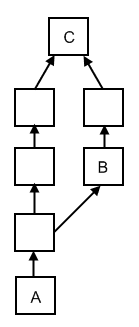 In Mercurial, the normal way of creating a branch is to simply clone the repository, which means you have a full copy of the entire history of the repo. The image to the right shows what an hg pull would look like when bringing changes from a cloned repository into the original repository.
"A" represents the starting point. "B" represents the first change from the repository we're pulling in. What you can see here is that when you pull changes from mercurial, a temporary "branch" is created containing all the changesets from NewProject in parallel with any changesets from Source.
"C" is the only actual merge, in the tranditional way we think of merging, because it actually brings all the changes together. This is beautiful in its simplicity because until you get to C you don't have to do any work. Each changeset represents what changed from the parent, so you just import all the changesets and associate them with the correct parent. Then only at the very end do you have to do any merges.
A merge in TFS is not so clever. Basically all TFS does is figure out every file that changed on either side, and do a 3-way merge on each in turn, resulting in a new changeset. The upside of this is we can select a single changeset, ignore all the changesets around it, and do a merge.
In Mercurial, you can't pick just one changeset and merge. You have to merge all the changesets before it too because that's the definition of how a merge works in Mercurial. The upside of this is that all the changesets are preserved.
For example, say you want to know who added a certain file. In mercurial, you'll be able to figure this out regardless of what "branch" (cloned repository) it was added in. In TFS, you're screwed because the file will be added in a "merge" changeset. The merge may not have been done by the same person who added the file (in fact, it usually wont be), so to find out who added it, you have to manually follow the branches and inspect the history on each in turn. The same is true (and worse, actually) if you want to know who updated a line in a certain file.
Sadly for me, we're constantly "de-tangling" our changes by doing merges by changeset. But lets think about that for a minute. Is merging a single changeset even a sane thing to do? It turns out, not so much, because its possible for this to result in a broken state. Here's how:
This happens like all the freaking time with project files (which are the bane of branches and merges). But fortunately it's easy to fix. Just remove the missing files from the project file. But I think you can probably see that if this happened to any file other than the project file, like a real source file, you'd be in a world of hurt.
I'm actually STUNNED, given how much effort TFS puts into protecting the users from themselves that it allows you to merge selected changesets in this way! But it does. And its a feature that Mercurial just can't match, even if it is a feature that can lead to trouble. But maybe that's a good thing.
Mercurial is a distributed source control system that works very well on Windows and has great windows shell integration with TortoiseHg.
TFS is a centralized behemoth that does source control but also integrates (usually poorly) with every product Microsoft has ever released (not including Bob).
I've used both of these, but I've used TFS much more extensively. I recently started looking into what it would take to switch from TFS to Mercurial and was rather surprised to find a couple things that TFS can do that Mercurial cannot.
The first of these is the ability to do a merge by changeset. In TFS, say you create some branches as follows:
- Create a new TFS project called Project
- Check in some source at $\Project\Source
- Branch that source to $\Project\NewBranch
- Do 3 checkins to $\Project\NewBranch
In TFS you could do this very easily.
- In Source Control Explorer, go to $\Project\NewBranch
- Right click and select "merge"
- Change to the "Merge by selected changeset" radio button
- Make sure the target is $\Project\Source
- Click next
- On the next page, select only the second changeset
- Click next and the merge is performed
You cannot do this in Mercurial, at least, not with a "merge" operation. The only way to accomplish the same type of thing would be to create a patch out of NewBranch and apply it to Source using the hg export and hg import commands.
So the big question is, why can't you do this in Mercurial? The answer goes to the heart of what makes Mercurial so different from TFS. The first thing to realize is that Mercurial does not have "branch lines."
In TFS when you branch code TFS knows that the one is a parent of the other and you can only merge across that branch line. This means you can't do merges between two siblings. For example, in B -> A <- C, you can't merge B to C. You can only merge along the branch lines (Unless you do a baseless merge, which doesn't really count).
 In Mercurial, the normal way of creating a branch is to simply clone the repository, which means you have a full copy of the entire history of the repo. The image to the right shows what an hg pull would look like when bringing changes from a cloned repository into the original repository.
"A" represents the starting point. "B" represents the first change from the repository we're pulling in. What you can see here is that when you pull changes from mercurial, a temporary "branch" is created containing all the changesets from NewProject in parallel with any changesets from Source.
"C" is the only actual merge, in the tranditional way we think of merging, because it actually brings all the changes together. This is beautiful in its simplicity because until you get to C you don't have to do any work. Each changeset represents what changed from the parent, so you just import all the changesets and associate them with the correct parent. Then only at the very end do you have to do any merges.
A merge in TFS is not so clever. Basically all TFS does is figure out every file that changed on either side, and do a 3-way merge on each in turn, resulting in a new changeset. The upside of this is we can select a single changeset, ignore all the changesets around it, and do a merge.
In Mercurial, you can't pick just one changeset and merge. You have to merge all the changesets before it too because that's the definition of how a merge works in Mercurial. The upside of this is that all the changesets are preserved.
For example, say you want to know who added a certain file. In mercurial, you'll be able to figure this out regardless of what "branch" (cloned repository) it was added in. In TFS, you're screwed because the file will be added in a "merge" changeset. The merge may not have been done by the same person who added the file (in fact, it usually wont be), so to find out who added it, you have to manually follow the branches and inspect the history on each in turn. The same is true (and worse, actually) if you want to know who updated a line in a certain file.
Sadly for me, we're constantly "de-tangling" our changes by doing merges by changeset. But lets think about that for a minute. Is merging a single changeset even a sane thing to do? It turns out, not so much, because its possible for this to result in a broken state. Here's how:
- Joe Bob adds a new file "hippo.cs" and updates the C# project file
- Joe Smith adds a different new file "giraffe.cs" and updates the C# project file
- Joe Smith merges his changeset and ONLY his changeset up
- The result of the merge does not compile. The error is, "Can not find file "hippo.cs"
This happens like all the freaking time with project files (which are the bane of branches and merges). But fortunately it's easy to fix. Just remove the missing files from the project file. But I think you can probably see that if this happened to any file other than the project file, like a real source file, you'd be in a world of hurt.
I'm actually STUNNED, given how much effort TFS puts into protecting the users from themselves that it allows you to merge selected changesets in this way! But it does. And its a feature that Mercurial just can't match, even if it is a feature that can lead to trouble. But maybe that's a good thing.
Subscribe to:
Posts (Atom)